


After years of working, teaching, and writing in this field, the pattern I see most in newcomers is not lack of ability. It is freezing. People look at the size of cybersecurity, see fifty job titles and a hundred acronyms, and conclude they are already too far behind to start. Most of my posts here are technical and hands-on; this one steps back and takes the long view. It is my cure for that freeze: a map, plus a floor. First, every room where cybersecurity work happens, so the size of the field stops being scary. Then the four foundations every one of those rooms stands on, because that is where a beginner's actual work begins.
This post is also the companion piece to my book, Cybersecurity Architect's Handbook, Second Edition. The map below follows the book's domain breakdown, and where a room deserves a book-length treatment, I point at the chapter that gives it one. The floor is a different story, and I will be plain about that boundary when we get there.
Start with what the field even is, because the movie version gets in the way. CISA, the U.S. cybersecurity agency, calls cybersecurity the art of protecting networks, devices, and data from unauthorized access or criminal use. Notice what that definition is about: protecting things people depend on. Not tools, not hoodies, not a product you buy. Risk is the possibility of something bad happening (a failed hard drive, a hurricane, a person with a grudge), and cybersecurity is the work of reducing those risks so information stays confidential, intact, and available. The honest part, and the framing that carries you through the whole field: the only fully secure system is powered off, unplugged, and unused. Everything running carries risk. The job is not eliminating risk, because that cannot be done. The job is understanding it and managing it down to a level the people who own it can accept.
One more thing before the tour: career changers, students, and IT professionals crossing over all belong here. A nurse already understands triage and incident severity. A teacher already explains risk to people who would rather not hear it. Someone who has run networks or managed servers already lives on part of the floor this post teaches. Nobody reading this is behind. The field is large, not exclusive.
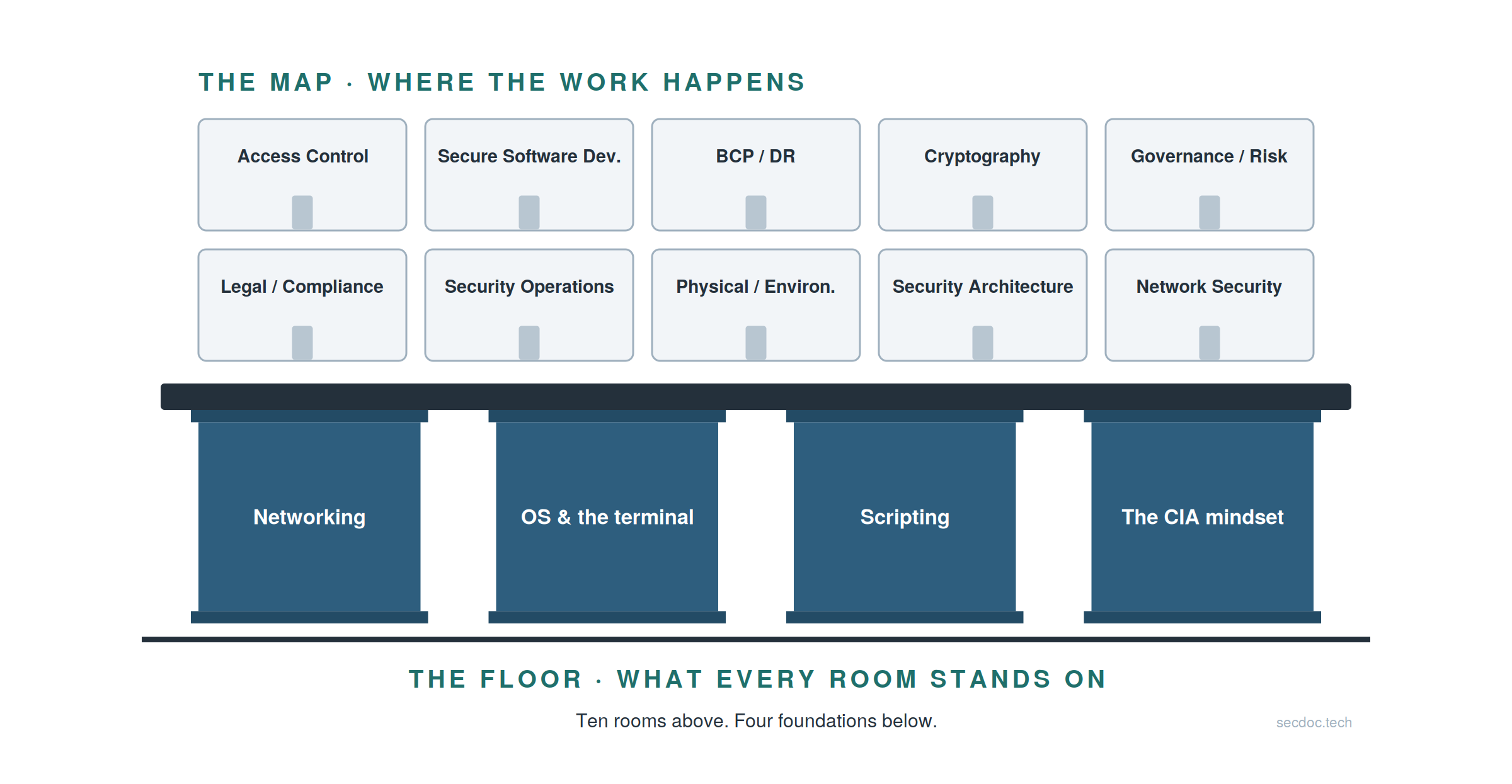
The whole post in one picture. Ten rooms above, where the work happens. Four foundations below, which every room stands on. We return to this picture at the end, annotated.
Three words the field runs on
Before the map means anything, three words need separating, because beginners blur them constantly. A vulnerability is a weakness that could be exploited: the unpatched server, the weak password, the setting nobody reviewed. The gap in the armor, whether or not anyone finds it. A threat is someone or something positioned to exploit that weakness; the person behind it is a threat actor, and the path they use (the email, the open port, the stolen badge) is the attack vector. Risk is the likelihood a threat actually meets a vulnerability, weighed against the impact if it does.
Your house, in these terms: the broken window latch is the vulnerability, the burglar casing the street is the threat, and the chance he tries that window, times what you would lose, is the risk. Fix the latch first on the house that backs onto the alley: that is risk-based prioritization, and it is the whole job in one sentence. You patch by risk, not alphabetically.
The distinction has teeth. A vulnerability with no threat behind it is not yet a risk, and a threat with nothing to exploit is not one either; risk lives where the two meet, scaled by impact. Say the informal formula out loud, risk is likelihood times impact, because it turns arguments about "is this bad?" into conversations about "how likely, how costly?"
The map: ten domains, one lens in the middle
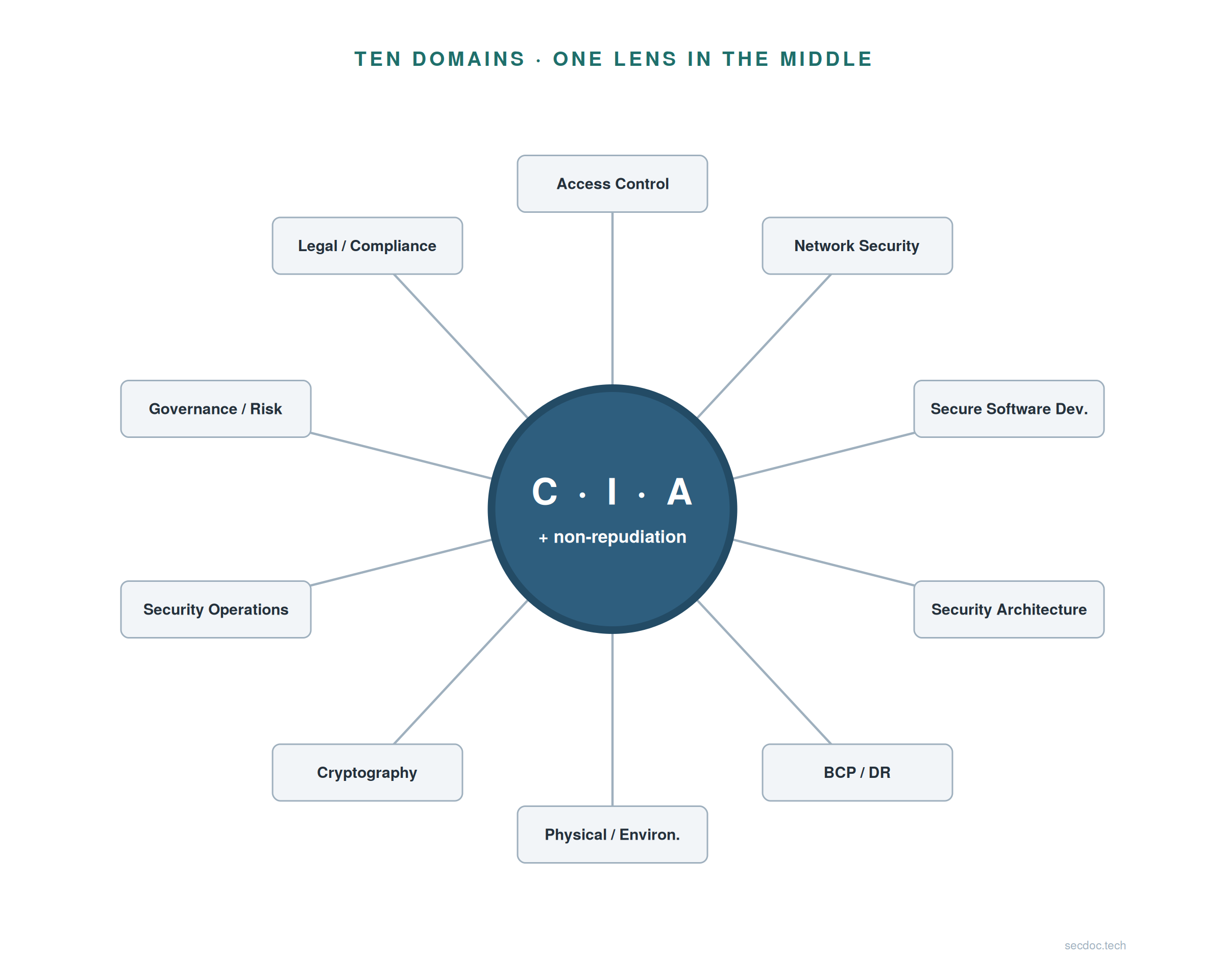
The ten-domain breakdown below is the standard one used by the major certification bodies, so learning these names now means every syllabus and job posting you meet later already looks familiar. It is also the map the Handbook walks in, at full depth; this tour keeps to orientation depth on purpose. Nobody memorizes ten definitions today. The goal is recognition.
The ten domains as a wheel, with the lens at the hub. Every domain exists to serve that center, which is why it is drawn as the hub and not as an eleventh room.
The lens first: CIA plus non-repudiation
Every control in every domain serves at least one of four properties, and this lens is the fourth pillar of the floor: the CIA mindset. Confidentiality: only the right people can see it (encryption scrambles data for anyone without the key; access controls decide who gets in at all). Integrity: it is what it claims to be, unaltered (hashes act as fingerprints, and one changed bit changes the fingerprint; digital signatures prove who sent it). Availability: it is there when the people who need it need it (redundancy, backups, denial-of-service defenses). Non-repudiation: nobody can deny what they did (certificates tie actions to identities; audit trails record who did what and when, which is why logs matter so much later in this post).
Try the lens on anything you can name. A password? Confidentiality. A backup? Availability. The camera in the lobby? Non-repudiation, mostly: it proves who walked in. Do three or four and it clicks that this works for everything. Treat it as a diagnostic tool, not trivia: when something breaks, ask which of the four it broke. And keep the stool image: stability needs all of them in balance, because a perfectly confidential system nobody can reach has failed at availability.
The two busiest front doors
Access Control is deciding which people, programs, and systems may observe, modify, or use a resource, and enforcing that decision: each resource limited to the users authorized for it, no further. A day here means access requests, role reviews, MFA rollouts, and questions like "why can this intern read payroll?" Entry jobs: IAM analyst and access administrator (IAM is identity and access management, the discipline of managing who is who and what they may touch). Identity work is steady, hiring, and everywhere. Through the lens, this is confidentiality made operational.
Security Operations is the day-to-day protection and control of information-processing assets (the applications, the hardware, the connections between them) and the routine tasks that keep security services running reliably. A day here means alert queues, log searches, triage, escalation, shift handoff notes: the heartbeat of a security team. The entry job is tier-1 SOC analyst (a SOC is a security operations center, the team that watches everything), the field's most common entry role and a superb teacher. Honestly: tier-1 work can be repetitive, and that repetition is precisely what builds pattern recognition nothing else teaches.
Building it right
Secure Software Development covers the processes and activities around planning, programming, and managing software, and the controls built in so the software and the data it processes stay confidential, intact, and available. A day here means code-review findings, scanner results to triage, and sitting with developers to fix what was found, diplomacy included. The cheapest place to fix a flaw is before it ships, which is why this domain pushes security into development instead of bolting it on after. Entry jobs: application security analyst, DevSecOps associate. The strongest door if you already write code.
Security Architecture is the concepts, principles, structures, and standards that guide how systems are designed, implemented, secured, and monitored: translating security requirements into practical, implementable controls. A day here means design reviews, control selection, and the recurring question "where does the trust boundary go?" (a trust boundary is the line between what you control and what you don't; hold that phrase, it returns below). Honestly: nobody starts as an architect. It is a destination requiring conversational fluency across most of this wheel, which is why the map matters, and the last section shows the ladder that reaches it. This room is also the one the Handbook is about: the whole book is the long-form answer to what happens in here and how a career grows into it.
The bedrock and the mathematics
Telecommunications and Network Security covers the technologies, transmission methods, and security measures that keep data confidential, intact, and available as it moves over private and public networks. Often called the bedrock of IT and security, and it earns the name: in most environments, losing the network means losing the business. A day here means firewall rule changes, VPN issues, segmentation projects, and reading packet captures when nobody else can. Entry jobs: network security analyst or administrator, the natural landing for IT crossover. This domain is also why the first foundation below is networking.
Cryptography is the science (some say art) of using mathematics to hide data from unwanted access: converting plaintext to ciphertext and back to guarantee confidentiality, integrity, and non-repudiation. Plaintext is readable data; ciphertext is the scrambled form. The movie version of this room is inventing codes; the job version is operating them well: keys rotated, certificates renewed before they expire, protocols configured to current standards. TLS is the encryption protocol behind the padlock in your browser, PKI is the certificate system that makes the padlock trustworthy, and PKI administration inside other teams is where the entry work actually lives. A standalone junior cryptography job is rare, and that is normal.
The rooms that decide what "secure" means
Information Security Governance and Risk Management is the frameworks, policies, principles, and standards used to set the criteria for protecting information assets, and to assess whether the protections actually work. A day here means risk registers, policy drafts, and mapping what the organization does against what a framework expects. This is the home of frameworks like NIST CSF 2.0, the map many organizations use to organize their whole security program; recognizing its vocabulary is the near-term win, and that is all the framework depth you need today. Entry job: GRC analyst (governance, risk, and compliance), a genuine entry door and a well-kept secret for career changers from regulated industries. People arriving from healthcare, finance, and law often find GRC the shortest bridge in the field, because they already speak regulation.
Legal, Regulatory, Compliance and Investigations covers computer-crime law and the regulations that bind an industry, plus the investigative side: identifying that an incident occurred, and gathering, analyzing, and managing evidence. A day here means audit evidence, control testing, chain-of-custody paperwork, and incident write-ups a lawyer could rely on. Chain of custody, in one line: the documented trail proving evidence was not tampered with, which is non-repudiation wearing a legal suit. Entry jobs: compliance analyst, and digital forensics examiner (usually entered through incident response).
The rooms people forget are on the map
Business Continuity Planning and Disaster Recovery is the preparation, processes, and practice that preserve business operations through a major disruption: identifying critical infrastructure, protecting it, and restoring services in time when something breaks anyway. A day here means recovery plans, tabletop exercises (a practice run of a disaster, done around a table, before reality runs the test for you), and backup verification, which is how you learn the backups don't restore before the day it matters. Entry job: business continuity analyst, often folded into risk teams. Availability turned into a profession.
Physical and Environmental Security is the evaluation of physical, environmental, and procedural risks wherever information systems live: site assessments, design criteria for protecting equipment and facilities, and the physical side of access control. A day here means badge systems, camera coverage, power and cooling, visitor procedures, site walk-throughs. Entry job: physical security specialist, increasingly converged with cyber teams. My favorite misconception check on the map lives here: "physical security isn't cybersecurity." A stolen unencrypted laptop defeats a great deal of expensive software, and a flooded server room takes availability to zero without a single packet of attack traffic. Both rooms are on the map because the lens demands them.
Four shapes attacks actually take
You do not need forty techniques today. You need four shapes, at recognition depth.
Social engineering attacks people, not machines: the phishing email, the call from fake IT support, the manufactured urgency, plus low-tech classics like shoulder surfing and tailgating through a badge door. Ask any room who has personally received a phishing attempt and every hand goes up, which is the misconception check done for you: attacks are not elite hacking against firewalls, most start with an email to a person, and that is why awareness training exists. Malware is software built to do harm: ransomware locks your data for payment, spyware watches, botnets conscript machines into someone else's army, and modern variants run "fileless," living in memory to slip past scanners (vocabulary for now, nothing more). Denial of service involves no break-in at all: flood a service with traffic until real users cannot reach it, at scale with thousands of hijacked machines (DDoS). The clean example of an attack aimed purely at availability. Spoofing and on-path attacks lie about identity (the forged sender, the fake website, the rogue server answering requests it should not) or quietly sit between two parties, reading and altering what passes. Aimed at confidentiality and integrity; the deeper catalog behind this family belongs to later study.
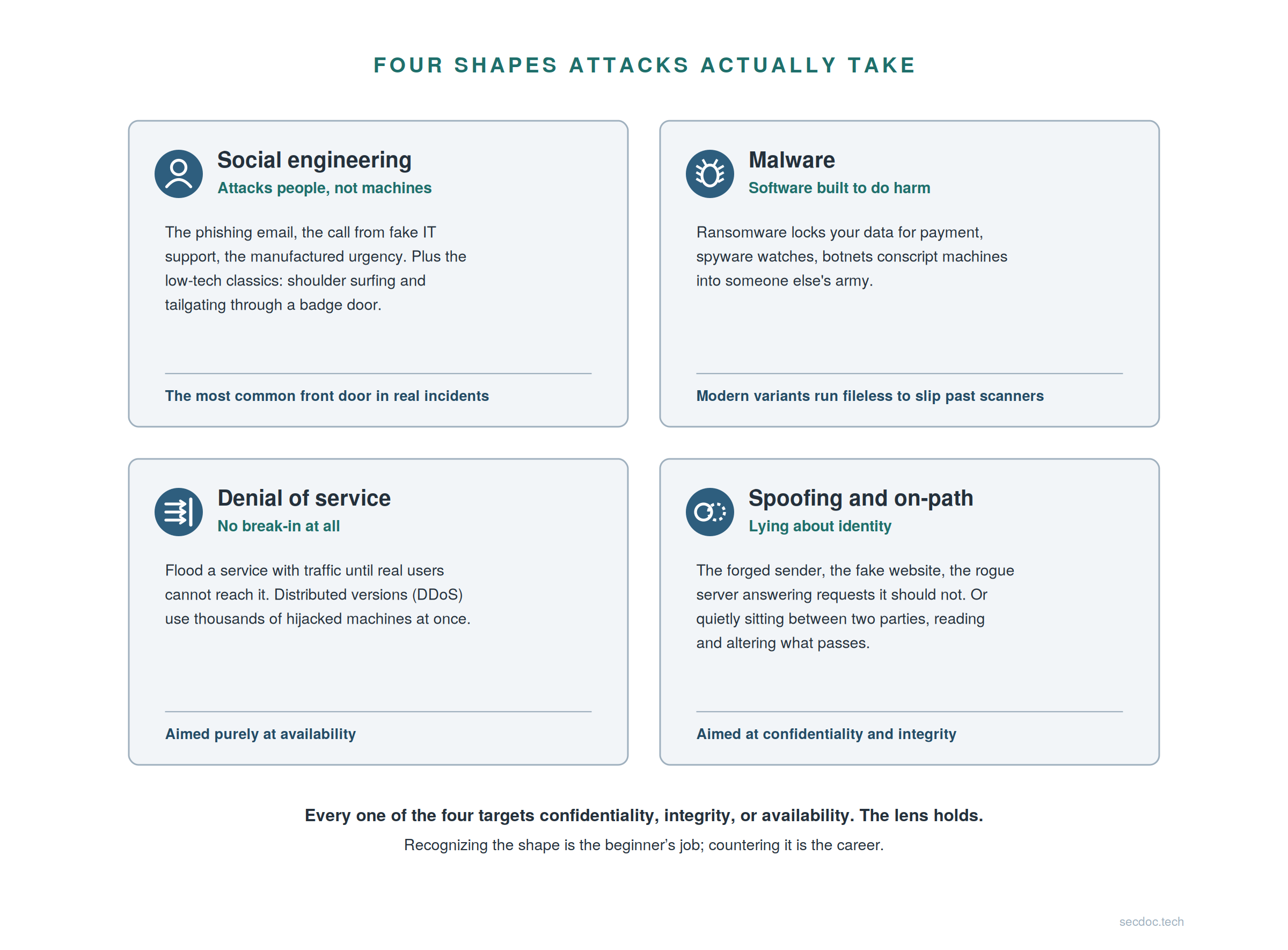
Every one of the four targets confidentiality, integrity, or availability. The lens holds. Recognizing the shape is the beginner's job; countering it is the career.
The honest close of the map
Nobody masters ten domains. Not me, not anyone keynoting a conference. Everyone orients in all ten, and most careers go deep in one or two while staying conversational in the rest. The wheel is a map, not a to-do list: your first job lives in one room, and the map's purpose is to let you choose that room on purpose instead of by accident.
Why does orientation pay if you will only work in one or two rooms? Because attackers do not respect domain lines, so incidents do not either. A phishing email (Security Operations) steals credentials (Access Control) to reach a flat network (Network Security) and exfiltrate regulated data (Legal and Compliance). Extend the chain one hop yourself: where does BCP/DR enter? When the ransomware lands. The first time an incident crosses rooms in front of you, the whole map earns its keep.
I said at the top that this post is companion material to the Handbook, and the map is where the companionship is tightest: the domain names and definitions you just walked track the book's, and the full domain treatment lives, at a depth this orientation deliberately does not attempt. The floor sections below are a different matter. The networking, Linux, and scripting material extends beyond what the book covers, and I will not pretend otherwise: the book goes deeper on the map, this post goes further on the floor, and that division of labor is what keeps the reference honest rather than promotional.
Work it through: choosing a room
The first of two exercises I run as discussion breaks in the live session, converted for a reader. Which domain surprised you by existing, and which would you start in? Defend the second answer by what a day there looks like.
The two halves are deliberate. "Surprised you by existing" surfaces the map's real work: for most people the answers are physical security, BCP/DR, and law, which proves the field is wider than the movie version. "Defend it by what a day looks like" is the discipline half: push past "pen testing looks cool" toward day-shape reasoning, because people quit jobs over day-shapes, not titles. If you picked the SOC, good; it is the visible front door and a fine choice, but look again at GRC and IAM before committing: underrated doors, calmer days. And if you cannot choose yet, that is a fine answer at this point in your orientation. The reps below will sort it.
The floor, part one: networking
You cannot protect a packet you cannot read
A packet is a small labeled parcel of data: every message online is broken into packets, addressed, and sent. That definition carries weight, because everything in security eventually rides the network. Phishing arrives as packets, malware calls home as packets, stolen data leaves as packets. And the security tools you will operate are, underneath, packet-readers with opinions: a firewall decides, packet by packet, what passes; an intrusion detection system reads packets looking for attack patterns; a SIEM (the system that collects logs from everywhere and makes them searchable; it returns in the Linux section) summarizes what the packets and systems reported. If networking is fuzzy, every one of those tools is a black box you operate on faith. If networking is solid, the tools become transparent: you know what they are looking at, so you know when to trust them. That is the argument for packets-first, and notice it is a security argument, not a networking one.
The layered model is a troubleshooting tool, not a poem to recite
Analogy first: the postal system. A letter goes in an envelope, the envelope in a mailbag, the mailbag on a truck, and every layer reads only its own label. The courier never opens the letter. Networks work the same way, as a stack where each layer does one job:
- Application: the letter, what you actually wanted to say
- Transport: the envelope, numbered so nothing is lost or misordered
- Network (IP): the mailing address, routed between networks
- Link: the local courier, delivery on your own street
- Physical: the truck and the road, signals on a wire or through the air
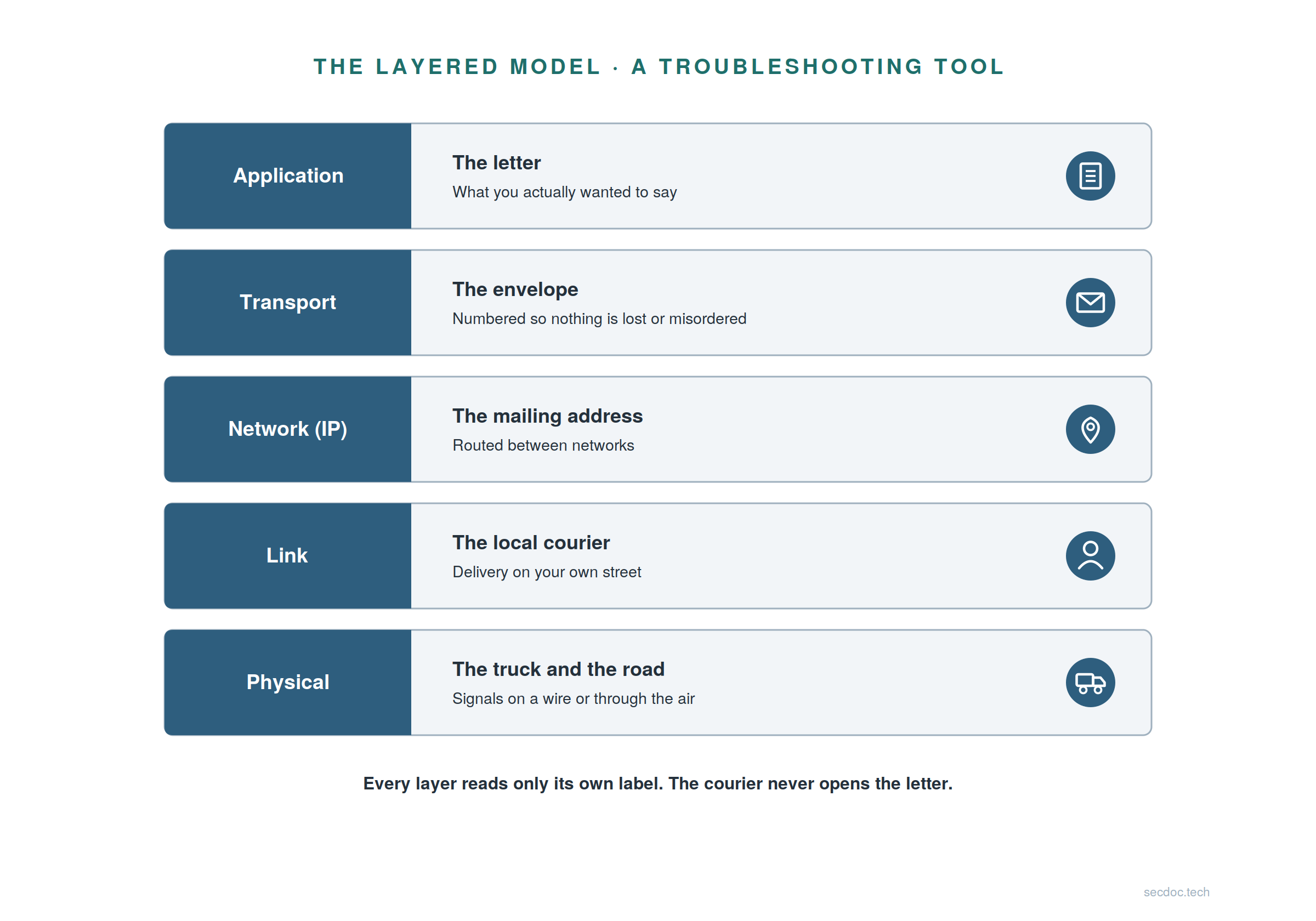
Mechanism second: because each layer does one job and reads only its own label, you can test one layer at a time when something breaks. Ping an address and it answers, but the name fails? The network layer is fine, so go look at DNS. One test just cut your search in half, and that halving move is the entire reason the model exists. It is also the skill interviews actually probe.
Misconception check third: reciting the OSI seven-layer mnemonic is not understanding. I show five layers because at first contact these five earn their space. The certification exams teach seven and 4 or 5; you will learn all seven when you study for one, and the difference will not change how you troubleshoot. But it is important to understand both, because when engineers describe problems or traffic they will be using either.
An address, a mask, and a gateway
Your machine's place in the world comes down to three values, no math required yet. The IP address (say, 192.168.1.23) is your machine's number on the network: how anything finds it. The subnet mask (255.255.255.0) is the boundary of your street: which addresses are local neighbors, reachable directly. The default gateway (192.168.1.1) is the door out: the router that forwards everything that is not local. The mechanism in one line: local traffic goes straight to the neighbor, everything else goes to the gateway, and that distinction is most of what routing means at this depth. One misconception worth naming, because it is a real troubleshooting scenario: the mask is not decoration, and two machines that disagree about where the street boundary sits genuinely cannot talk properly. Where do the three come from? Usually DHCP, the network's front desk: at check-in it hands your machine a room number, a floor map, and directions to the exit.
Three quiet services under everything
Three services run so quietly you forget them until they break, and when they break, everything looks broken. DNS turns names into addresses: you ask for a site by name, DNS answers with the number the network actually uses (which is why a DNS failure looks like "the internet is down" to a user; reason it out from the layers above). DHCP hands machines their place at check-in, as above. NTP keeps clocks agreeing, and it is the one nobody has heard of and the one whose failure quietly poisons investigations: logs from different systems that disagree about time cannot be trusted in order, and evidence out of order is barely evidence.
I am pointing at these, not re-teaching them. The full mechanics, from the wire up, are their own piece: the names, addresses, and time post on this site is your designed next step after tonight's reps.
The security bridge: flat networks fail
Here the mechanics pay off into security. Picture a flat network: everything can reach everything, so one compromised laptop becomes a whole-company incident. The attacker walks sideways, room to room, unopposed; that sideways walk is called lateral movement. The fix is trust boundaries: zones of different trust with checkpoints between them, so a breach in one room no longer opens every door. That is segmentation, and the Telecommunications and Network Security domain is where it is practiced. The misconception to kill early: "we have a firewall at the edge, so we're segmented." An edge firewall guards the front door of a building whose interior halls are wide open.
Generalize the idea and you get defense in depth: no single wall holds, so you stack layers. The perimeter screens what enters and leaves. Segmentation contains what gets through. Identity checks who is asking (MFA is a second proof of identity beyond the password; SSO is one careful login across many systems, convenient and exactly why it is managed carefully). Endpoints stay patched, monitoring watches all of it, and trained people form the layer attacks target first. The asymmetry is the whole argument: an attacker must beat every layer, while a defender needs any one of them to catch the attempt. The honest corollary runs the other way: one misconfigured layer is not game over when the others hold. Perimeter-only security meant one mistake was the whole game, and that is the design this model retired.
The road ahead from this foundation is long, and I will name it at orientation depth only. Segmentation grows from accident into designed policy. Zero trust takes the idea to its conclusion: verify every request, trust no location. Cloud networks turn the walls themselves into software, and wireless, software-defined networking, and houses full of under-defended IoT gadgets keep changing the terrain. The network keeps changing shape, and the floor underneath does not: addresses, layers, and trust boundaries run through every one of those futures, which is why the floor came first. Those are rooms upstairs, the Handbook's side of the house rather than this post's, and fixing flat networks is a career.
First reps: networking
Free, tonight, no lab required.
- Read your own machine's addressing. Find your IP address, mask, gateway, and DNS server (
ipconfig /allon Windows;ip addrandip routeon Linux or macOS). Say out loud what each one is for. The narration is the point: saying "this is my door out" is what fixes the concept. - Run a traceroute and narrate it.
tracertortracerouteto a website you use. Hop one is your gateway, the door out. Narrate where your street ends and the wider internet begins. - Take one packet capture and find your own DNS query. Install Wireshark (free), capture while loading a page, filter for
dns, and find the query your machine sent. Your first packet, read with your own eyes. Expect a small jolt: this is the moment packets stop being a metaphor.
Three reps, one evening. After them, the network is real.
The floor, part two: Linux and the terminal
The servers, the tooling, and the cloud all run on it
Plain terms first, so nobody has to nod along pretending: Linux is a family of free operating systems, and a distribution ("distro") is one packaged variant, like Debian, Ubuntu, or Fedora. Now the case, in three facts and without tribalism. Most of the internet's server infrastructure runs Linux, so the systems you will defend are overwhelmingly Linux systems. The security toolbox (scanners, capture tools, forensics kits, the SIEM stack) is built on and for Linux first. And cloud infrastructure is Linux under the branding: every major provider's default compute, containers included, is a Linux machine you rent by the hour.
You do not have to abandon Windows; Windows expertise stays valuable, and the scripting section says so explicitly. You have to stop being a stranger to Linux, because the terminal is where security work actually happens: reading logs, examining systems, running the tools. When someone tells me "Linux is hard," they usually mean "the terminal is unfamiliar," which is exactly the wall the next part lowers.
The terminal is a conversation, not an exam
A terminal session has three parts, taking turns. The prompt is the machine saying "your turn"; it names who and where you are. The command is you, saying what you want in the machine's own words. The output is the answer, including silence, which usually means "done, no problems." That last point surprises people: many commands say nothing on success, and that is Unix manners, not an error. The mindset shift underneath: clicking is choosing from what a designer offered; the terminal is telling the machine what you want. And nobody memorizes commands first. You learn them like phrases in a new city, by needing them.
Nine commands cover your first months, and they stick better as three verbs than as vocabulary. Navigate: pwd (where am I), ls (what's here), cd (go there). Inspect: cat (show me the file), less (page through it), grep (find lines that match). Manage: cp and mv (copy, move), mkdir (make a folder), rm (delete, forever). About rm: there is no recycle bin down here, no undo. Gone. Every command that changes things earns a moment of respect before Enter; rm earns two. And flag grep now: "find lines that match" sounds humble and turns out to be half of security work. It returns as the hero of the scripting section.
Permissions are the security model you can read
This is the security heart of the Linux foundation. Every file has an owner and a group, and one short string states exactly who may do what:
-rwx r-x r-- report.sh
Decode it segment by segment. rwx: the owner may read, write, and execute. r-x: the group may read and execute. r--: everyone else may read only. That string is access control made visible, the same idea the Access Control domain scales up to entire companies, small enough here to read in one line. When you meet a case like rw-rw-rw-, ask the security question: everyone can rewrite this file; when is that a problem?
sudo deserves equal weight, and a misconception check of its own. It is not a god-mode toggle. It is borrowed authority: run one command with administrator rights, then hand the authority back. Per command, deliberate, and logged. The log is the point: every sudo use is recorded (who, what, when), and that is non-repudiation from the lens section, running quietly on every Linux box you will ever touch. You just met a CIA property in the wild.
Know what is running, and where the evidence lives
Three ideas make a machine legible. Processes: ps and top answer "what is running?", and the security question is always one word longer: "what is running, and should it be?" Unfamiliar process names are how many intrusions first get noticed, and that extra word is the habit that turns an administrator into a defender. Packages: software arrives through a package manager (apt on Debian-family systems, dnf on Fedora-family), one front door to install, update, and audit what is on the system; updates are patching, and patching is defense. Logs: /var/log is the system's diary of logins, errors, and services starting and stopping. auth.log records every login attempt on a Debian-family system, successes and failures alike (on Fedora-family and other systemd-journal systems, read the diary with journalctl instead). Evidence lives here.
One line to carry out of this room: everything a SIEM ever shows an analyst started as a line in a log file here. The million-dollar dashboard and this quiet directory are the same evidence at different scales. The full pipeline is its own piece on this site; tonight, the directory is enough.
The terminal teaches you the terminal
Two tools make you self-sufficient. The first is man, the manual built in: every command ships with its own documentation, searchable, offline, free. Reading it is a skill, not a confession. Beginners believe professionals have everything memorized; professionals check man pages constantly, and the flags you will wonder about (ls -la, grep -i) are all in there.
The second is the pipe. The | symbol sends one command's output into the next as input:
grep "Failed" auth.log | wc -l
Read it aloud: find every line containing "Failed", then hand those lines to the counter. How many failed logins, in one breath. Each tool does one small job; the pipe composes them into answers no single tool offers. Now ask what you would change to count failures for one specific user, and reason toward a second grep in the chain. Notice what just happened: you have already started scripting. Hold that thought.
First reps: Linux
Free, tonight, no lab required.
- Install one distro in a virtual machine. VirtualBox is free; Ubuntu or Debian are beginner-solid choices. The VM matters more than the distro, because a machine you can break safely converts fear into curiosity, and breaking things safely is the entire pedagogy.
- Find your own auth log. On a Debian-family system:
/var/log/auth.log. Open it withless. Every login attempt on your machine, recorded. Read a few lines and translate them aloud. Deliberately unglamorous, deliberately powerful: evidence-reading is the daily bread of the SOC. - Grep it for failed logins.
grep "Failed" /var/log/auth.log, and read what comes back. On a fresh VM it may be quiet, so fail a login on purpose, then look again. You just generated evidence and then found it: the entire detection pipeline in miniature, on a laptop, free.
Keep that log open. It is the star of the next section.
The floor, part three: scripting
Reading a thousand lines versus asking one question
Scripting multiplies a beginner in three concrete shapes. Automation: the boring task, done right, every time; anything you do twice by hand is a candidate, and security is full of tasks done daily. Log parsing: a thousand log lines are unreadable by eye and searchable in a second by script, and the auth log from the last section is about to prove it. Glue: every security tool speaks text, so output from one becomes input to another, and scripts are the glue between tools that were never designed to meet.
And you already started. The grep one-liner from the Linux section was your first script's first line. Scripting is not a new mountain after the Linux mountain; it is the same terminal, composed, and saved for reuse. That continuity is what keeps career changers from stalling here.
Bash first, Python when logic outgrows the pipe, PowerShell because Windows runs on it
The starting-language question, answered honestly instead of tribally: a sequence, not a war. Bash first, for one reason: you are already in the terminal, and Bash is the terminal, scriptable. It is on every Linux box, every container, every server you will ever shell into. Start here because starting requires nothing: no installer, no environment, no excuse. Python second, when logic outgrows the pipe. The promotion rule, made explicit: when you need real data structures, real error handling, or the script passes roughly 100 to 200 lines, it has quietly become a program, and moving it to Python is the honest response, not an admission of defeat. That is the normal lifecycle of a useful script. PowerShell third, with genuine respect: the Windows world runs on it (Active Directory, Exchange, endpoints), and its pipeline carries structured objects instead of text, which changes how you think, in a good way. If your first job touches Windows, this arrives sooner than you expect; if you work in a Windows shop today, PowerShell may fairly be your step two.
The misconception check: "real programmers skip Bash." No. The sequence exists because each tool teaches the next, plenty of twenty-year veterans still reach for Bash daily, and knowing when to move between them is itself an engineering skill.
Safety is a day-one habit, not an advanced topic
The habits formed in week one are the ones that persist, so form these four now.
Quote your variables. rm $file on a filename with a space deletes the wrong things; rm "$file" does not. The quotes are load-bearing, every time, and unquoted variables are the number-one defect class in shell scripting, full stop. To feel it safely, create a throwaway file named my report.txt in an empty practice folder and watch what each version does.
Test on copies. Never point a new script at the only copy of anything. cp the log, run against the copy, compare, then trust. The five seconds this costs has saved more careers than any certification.
ShellCheck exists. A free checker that reads your script and flags the classic mistakes, unquoted variables included, before they run. Professionals run it on everything; you can start on script one.
Read a script before you run it. Every "paste this install command" from the internet is code you are trusting blind. Reading a script before running it is the security habit itself: the same skill this whole field practices, pointed at your own protection.
First reps: scripting
Free, tonight, no lab required.
- Parse the auth log from the Linux section. Write a small script that prints the failed logins and counts them by username. Start from the one-liner you already ran and grow it one pipe at a time. Same log, new power.
- Automate one boring task you actually do. Renaming a batch of files, making a dated backup copy of a folder, anything real from your own week. Real tasks teach; toy examples evaporate.
- Read one script from the internet before running it. Take any install script you were about to paste, open it first, and say out loud what it does. If you cannot yet, that is the rep. Do it again next week.
The thread is now visible: terminal skills found the evidence, and scripting skills question it at scale. Same file, growing capability. That is the floor connecting under your feet.
Work it through: your weakest leg
The second exercise from the live session, and it works best said out loud to another person, because public commitments stick. Which of the four foundations is your weakest: networking, the terminal, scripting, or the CIA mindset? And what is the first rep you will do this week? Be specific enough that someone could check.
Hold the specificity bar kindly but firmly. "Learn Linux" fails the checkable test; "install Ubuntu in VirtualBox by Friday and grep auth.log for failed logins" passes it. If you can, form an accountability pair: two people, same rep, check on each other midweek. The pattern I see every time: scripting gets named weakest most often, and if that is you, your rep is the first one above, because it starts from a line you have already run. If you named the CIA mindset, that is a thoughtful answer, and your rep is mapping five controls you meet this week (a badge reader, a backup job, a password prompt) to the four properties.
Putting it together
The roles the field builds toward, and the architect who connects them
Zoom out from domains to the team picture. SOC analysts watch. Admins and IT ops harden. Pen testers probe. Incident responders contain. Security engineers build. Compliance teams verify. Each of those is a career, and several are the entry doors from the map. At the hub sits the architect, who designs what all of them operate: not because architects outrank everyone, but because the role's job is connection, designing what the SOC watches, what engineers build, what compliance verifies.
The destination skills are two: technical depth across domains, plus the ability to translate risk for people who do not speak packet. The architect keeps the strategic view and the granular detail in focus at once, which is why the role sits at the top of the technical ladder and why nobody starts there. The architect's full responsibility set is treated properly in the Handbook; here is the one thing a beginner should act on now. Translation is not a skill that arrives with seniority. It is practiced from day one, and explaining your traceroute to a patient friend this week is genuinely the first rep of an architect skill.
Certifications open doors; the homelab builds what is behind them
Stage certifications by category, because categories outlive exam codes, and notice that this trio maps onto the floor you just learned. Not a coincidence. The table gives the entry credential for each category and the natural next step once it stops surprising you.
| Category | It proves | Entry cert (representative) | Next step after it |
|---|---|---|---|
| Networking | You speak packet | CompTIA Network+ (N10-009) or Cisco CCNA (200-301) | Cisco CCNP Enterprise, for real depth in routing and switching |
| Security fundamentals | You speak risk and control | CompTIA Security+ (SY0-701), or ISC2 CC as a lower-cost entry | CompTIA CySA+ (CS0-004) on the defensive path, or CompTIA PenTest+ (PT0-003) on the offensive path |
| Linux | You can work where the servers live | CompTIA Linux+ (XK0-006) | Red Hat RHCSA (performance-based, and respected for exactly that reason) or LPIC-2 |
Three currency notes, checked at publish. A Security+ refresh is coming: draft objectives for a successor (SY0-801) are public and training channels point at a late-2026 launch, though CompTIA had not formally announced it when this post published, so check the current version at comptia.org before buying materials. CySA+ is mid-transition: CS0-004 went live in June 2026 and the prior CS0-003 remains sittable until late December 2026, so either code earns the same credential. And ISC2 CC has offered free training before; confirm the current offer at isc2.org.
The honest line I give every class: certifications get you the interview; the homelab gets you through it, because interviewers can tell within three questions whether a homelab stands behind the paper. Order the certs by category, take them when the material stops surprising you, and verify exam versions before you buy anything, because they change. And note that the table stops one rung past entry on purpose: the destination credentials (CISSP, CompTIA SecurityX, the expert-level exam formerly called CASP+) belong to the whole-career certification planning the Handbook provides, and this post deliberately leaves them off the table.
The learning path, drawn as a ladder
The learning path as a ladder. The four foundations are the legs; the rungs climb from orientation across all ten domains, to depth in one or two, to a first role, to the long climb where the architect's rooms open. The ladder only stands because the legs do.
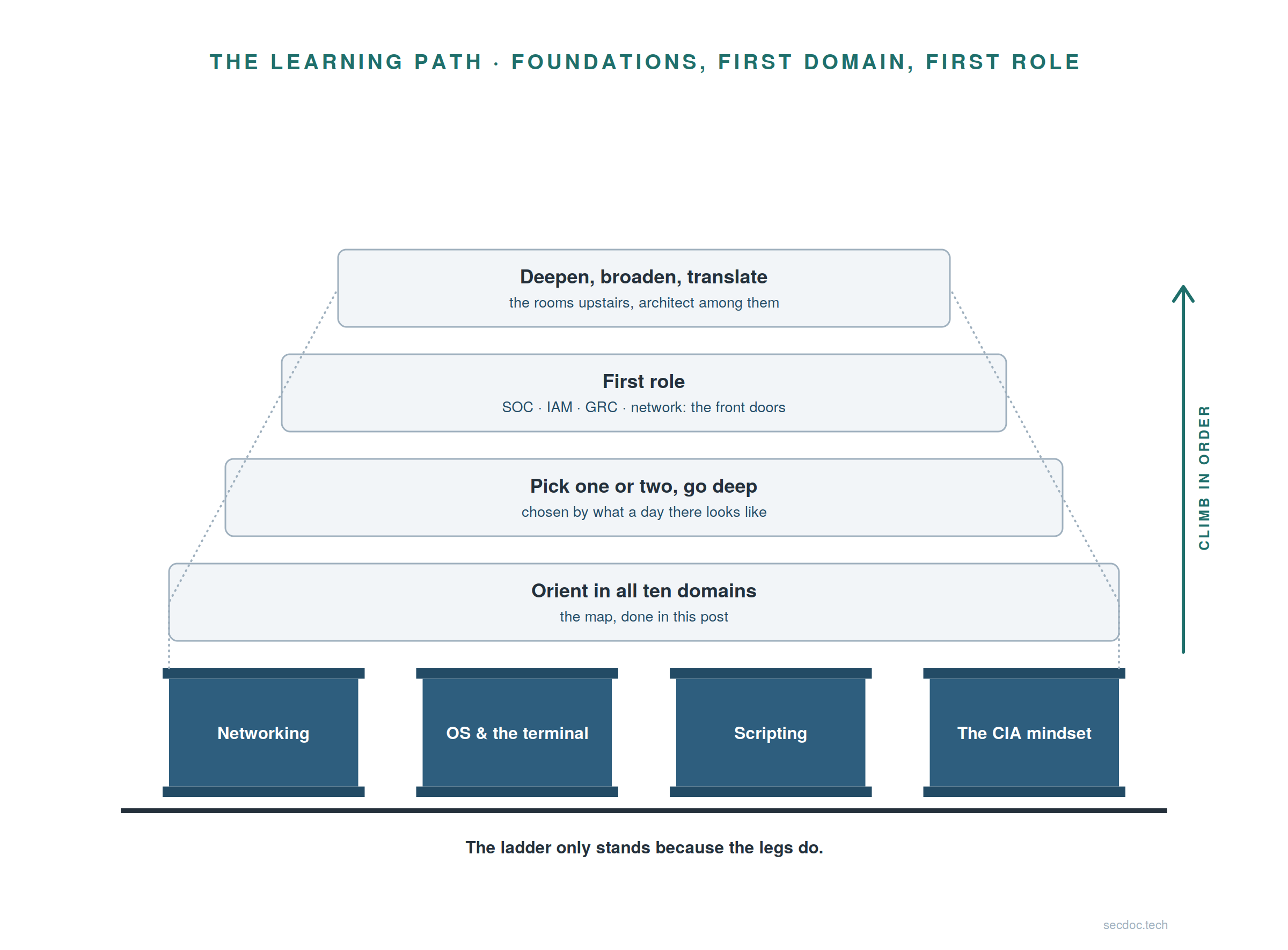
Walk it bottom to top. The legs first: networking, the terminal, scripting, and the CIA mindset, which is literally this post. Then orient across all ten domains, which the map section just did. Then pick one or two domains and go deep, chosen by what a day there looks like. Then a first role through one of the front doors: SOC, IAM, GRC, or network. Then the long climb where roles broaden and the architect's rooms open. Those upper rungs are the Handbook's whole subject: the book begins roughly where this post ends. Climb in order: skipping the legs is how people end up on rung three explaining tools they cannot see inside, and you now know what that black-box life looks like. One encouragement for the career changers: place yourself on this ladder honestly, and you will usually discover you are further up than you assumed.
The homelab is the connective tissue
Everything I know that matters, I learned by building it at home with free tools and breaking it on purpose. The first build is deliberately small: three virtual machines and curiosity. A firewall VM running OPNsense, free and genuinely production-grade. A Linux VM, your machine from the Linux reps, promoted from exercise to permanent resident. A Windows VM, because evaluation licenses cost nothing and businesses run Windows, so learn to defend it. The fourth component, curiosity, is the only one that cannot be downloaded.
The pedagogy is the break-observe-fix loop. Break the firewall rule and watch the ping die. Break the DNS setting and watch everything "go down." Fix them. That loop is the discipline itself, and no vendor can sell it to you. Which is the standing argument of this whole site, said plainly: the free stack teaches the discipline the commercial product sells. The commercial product automates a discipline; the free stack makes you perform it by hand, which means you learn it. Later, when an employer hands you the commercial version, you will know what it is doing underneath, and that knowledge is the difference between an operator and an engineer.
I am pointing rather than re-teaching here too: step-by-step homelab build guides, firewall installation and configuration included, already live on this site. Start there when the reps above stop being enough, which will be sooner than you think.
The floor-first rule
[Figure: slide 45 from the deck] Caption: The map and the floor, reprised and annotated. Each room now carries its entry job family; each pillar carries the skills and reps attached to it. Compare this against the clean version at the top of the post. The difference is what you just learned. Alt text: The same two-story diagram from the opening figure, now annotated. Each of the ten domain rooms lists its entry job family, and each of the four foundation pillars lists the skills covered in the post, with the CIA lens labeled as the lens on everything.
Pick any room on that map and trace which pillars its daily work stands on. The SOC analyst reads packets, lives in the terminal, scripts the repetitive parts, and reasons through the lens. The GRC analyst maps controls that all serve the same four properties. The answer is all four pillars, for every room, every time, which is this post proving itself.
So here is the operational rule for beginners, the one sentence to keep if you keep only one: you cannot secure what you do not understand, so understand the floor first. The rooms will still be there.
Where to go from here
On this site. The pieces behind this one, in the order they were designed to follow it: names, addresses, and time from the wire up extends the networking foundation; from log to incident extends the log thread into the full SOC pipeline; and the homelab build guides extend the last section into a working lab. This post is the front door; those are the hallways.
Two primary sources, at orientation depth. The NIST Cybersecurity Framework 2.0 (nist.gov) is the map many organizations use to structure their entire security program; read it for orientation, not memorization, because recognizing its vocabulary is the near-term win. MITRE ATT&CK (attack.mitre.org) is the catalog of how attackers actually operate, organized by tactic and technique; browse one technique a week and the news starts making sense.
The book. Cybersecurity Architect's Handbook, Second Edition is the long-form version of the map and the ladder: the full domain treatment this post kept at orientation depth, the architect role in detail, and the path from the front doors to it. Start it when the map stops being enough.
A curated reading list. Books worth your hours, gathered in one place: github.com/secdoc/Recommended_Reading.
Now go do tonight's reps. A post that ends with a nod changed nothing. A post that ends with an installed VM changed a career.


