


I work two support queues. In one, readers email because a lab created output or did not match the screenshots within the book and the error message blamed authentication. In the other, my extended family calls because the smart doorbell logs visitors an hour before they arrive, or the Wi-Fi is "broken" while every light on the router looks fine. Different vocabularies, same questions, and after enough years of fielding both I finally noticed what they had in common: whether the question comes from a lab or a living room, the answer keeps turning out to be one of the same three services. That observation is this post.
Everything you did online today started with a lookup, a lease, and a clock. Before your browser fetched a single byte, DNS turned a name into an address; before that could happen, DHCP gave your machine an address at all; and underneath both, NTP kept the clock honest enough for certificates, tickets, and logs to mean anything. None of the three carries user data. They carry the ability to carry user data, which is why they sit underneath everything else, and why a failure in any of them makes everything above it look broken.
The three fail in different personalities. DNS fails loudly, and it lies about itself: the tickets say "the internet is down," every app times out at once, and nobody writes "DNS is broken." The tell is that ping by IP address still works. The network is fine; the resolution path is not. DHCP fails quietly, an outage in slow motion: devices holding leases keep working, sometimes for days, while new and returning devices get nothing and 169.254.x.x self-assigned addresses spread on the lease timer's schedule, not the failure's. And time fails quietest of all: drift accumulates silently, no alert fires, and then authentication and log integrity fail together, with the record you would use to debug it corrupted by the same fault.
One misconception to kill up front, because readers and students merge these constantly: a DNS TTL, a DHCP lease time, and an NTP poll interval are three unrelated clocks. All of them answer "how long until this gets checked again," but they belong to different protocols, measure different things, and produce different failure modes.
This post is about two hours of my class material rewritten for a reader at a terminal: DNS, then DHCP, then NTP, each part running mechanics, design, security, then the diagnostic ladder. The depth target is specific: by the end you should be able to predict what a packet capture will show before you take it.
The book behind the blog. This post sits in the network security architecture domain of my Cybersecurity Architect's Handbook, Second Edition, where the homelab work here connects to the full architecture discipline. If the post is useful, the book goes deeper.
The DNS Half: Names Into Addresses
Humans and configs remember names; routers move packets to addresses. DNS is the connector between them, and every connection starts there: web, mail, Active Directory, your monitoring, your patch tooling.
The namespace is a distributed database
DNS is one namespace run by thousands of operators, and nobody holds the whole database. The trick is delegation: a zone is the slice one operator administers, and the tree is zones stitched together by NS records in each parent pointing at each child's servers. The root knows who runs .com, .com knows who runs example.com, and example.com's servers hold the answer. A phone tree, not a phone book: you find things by following referrals down.
Two precision points. "Zone" and "domain" are not synonyms: a domain is a subtree of the namespace, a zone is the administrative slice you actually hold, and the example.com zone ends wherever you delegate away. And when a name server sits inside the zone it serves, the parent carries glue A/AAAA records for it, because otherwise you would need DNS to find DNS. Broken glue reappears in the diagnostic ladder.
Knowing who runs each layer is an outage skill, because "call the DNS people" is not a plan. ICANN and IANA coordinate the root zone, and twelve organizations operate the thirteen root server identities, served from well over a thousand anycast instances rather than thirteen machines. Registries run the TLDs (Verisign holds .com, PIR .org). The registrar is the retail layer where your credit card goes: it records your NS delegation with the registry and answers no queries for you. Your authoritative servers, or the provider you point NS at, answer for your names: the part you own and the part you can break. And a resolver somewhere does the lookup work for clients. One security note that always lands: domain hijacking usually attacks the registrar account, not the servers.
The resolution walk, cold cache
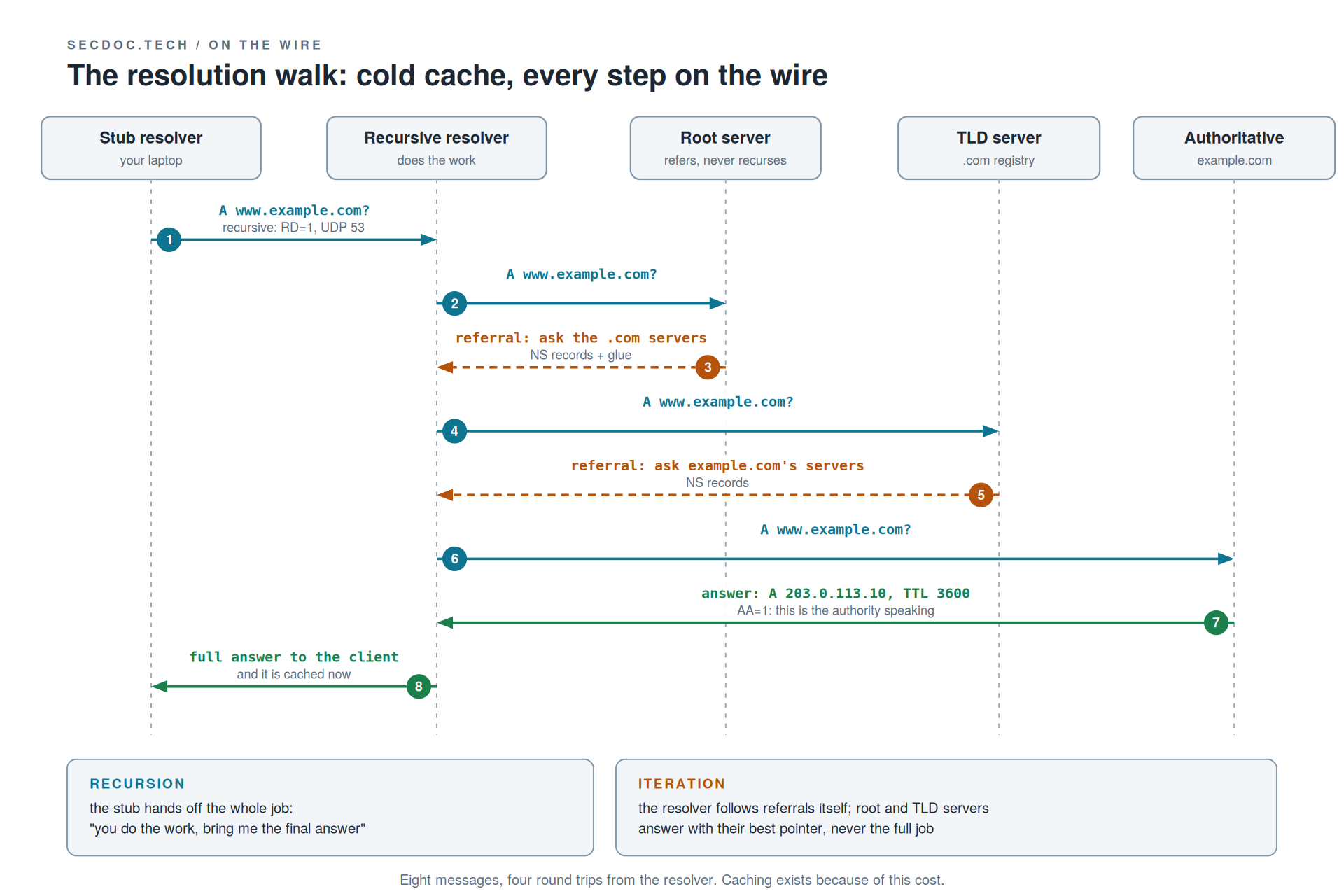
The stub resolver on your laptop does one clever thing: it sets RD=1, recursion desired, and hands the whole job to its configured resolver. The recursive resolver then iterates, because root and TLD servers refuse recursion by design and answer only with referrals: NS records for .com (plus glue) from the root, NS records for example.com from the TLD, and finally the answer from the authority, marked AA=1 with a TTL attached. Referrals never carry AA=1.
Count the cost: eight messages, four round trips from the resolver plus the client's own. Hold that number for the next section.
Transport, exactly: UDP port 53 first. TCP 53 is real, not theoretical, but it arrives in two cases: truncated responses (TC=1 tells the client to retry over TCP) and zone transfers. EDNS0 raised the old 512-byte UDP ceiling, which is why TCP fallback is rarer than older textbooks imply. And the bootstrap question someone always asks: the resolver learns the root servers' addresses from a root hints file it ships with.
The same query five minutes later
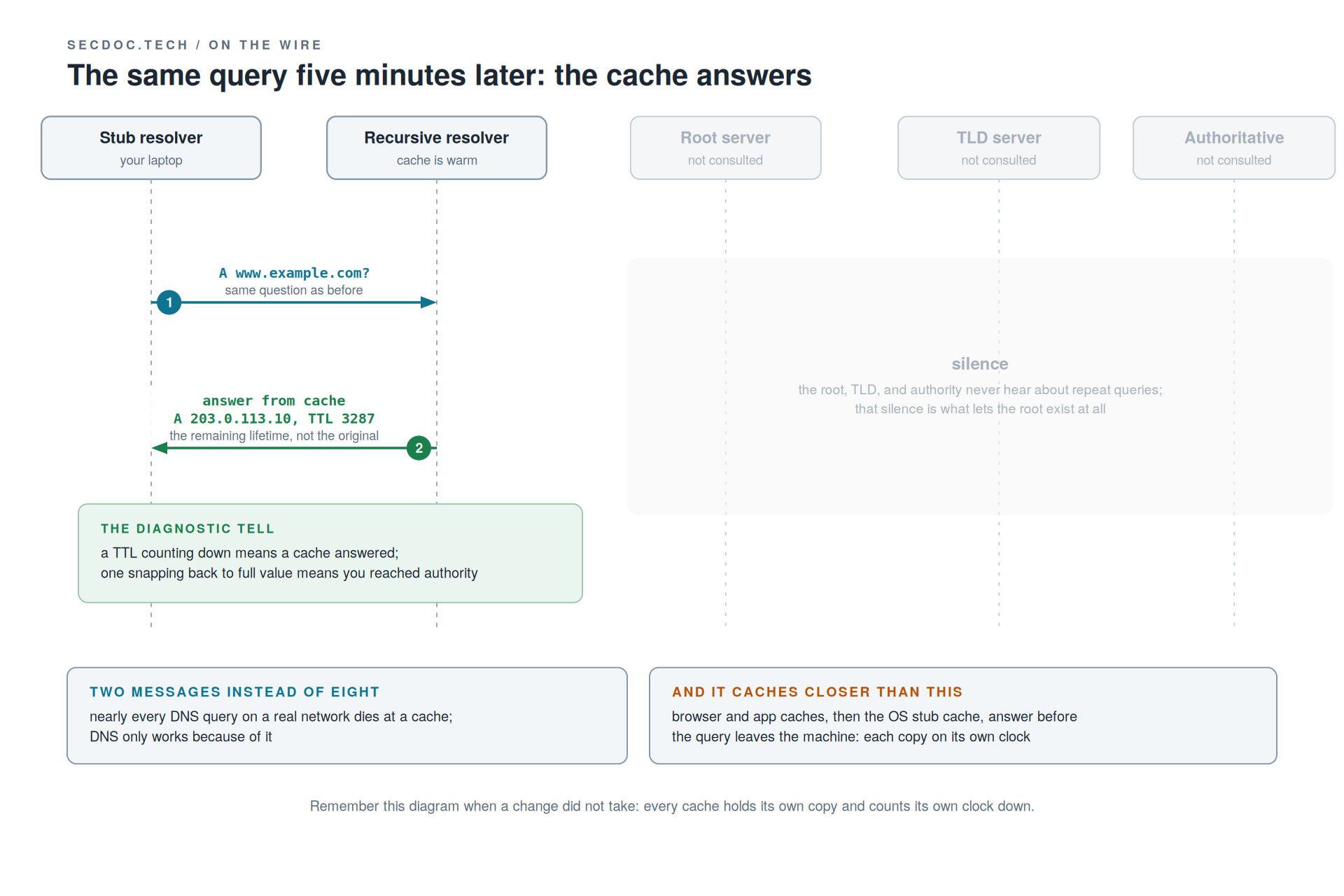
Two messages instead of eight, and the TTL reads 3287 instead of 3600. That decremented TTL is the most useful diagnostic observation in DNS: caches hand out the remaining lifetime, not the original. Dig the same name twice and watch the TTL count down: you are watching a cache. See it snap back to full value: you reached the authority. No tool flag does more work than that habit.
It caches closer than the resolver, too. Browser and application caches answer first, then the OS stub cache, before a query ever leaves the machine. That is why "works in Chrome, fails in curl" is a real symptom and not witchcraft: two caches, two clocks. And caching is not an optimization bolted onto DNS. DNS only works because of it; the root would evaporate under direct query load.
TTLs and the migration rule
The mechanic that burns people: you set the TTL at the authority, but you do not control the caches. The TTL is a ceiling on staleness, a promise about when a cache must re-ask, never when it may. Resolvers may clamp a five-second TTL up to their own minimum, and flushing DNS on your laptop clears exactly one cache. The other ten thousand resolvers did not get the memo.
The trade runs both ways. Long TTLs (hours to days) drop load and latency, but changes crawl out over the full window and you cannot recall a cached answer. Short TTLs make failover agile, but query volume climbs and every lookup rides your resolver's health more often.
So the migration rule, with numbers. The record's TTL is 86400, one day. Lower it to 300 today, and anyone who cached it this morning still holds it until tomorrow; lowering a TTL during the cutover changes nothing already cached. The sequence: drop the TTL at least one full old-TTL period before the change, wait that period out, make the change, verify at the authority, then restore the TTL. We come back to this in the discussion question, because it is the most common self-inflicted DNS outage in production.
Negative caching: absence gets cached too
NXDOMAIN ("that name does not exist") and NODATA ("name exists, no record of that type") are answers, and resolvers cache them like any other answer. The negative-cache lifetime comes from the zone's SOA: the MINIMUM field, capped by the SOA's own TTL, per RFC 2308. Without it, every typo would hammer the authorities on every retry.
The classic self-own is a timeline. 10:00, you dig a new hostname before creating it: NXDOMAIN, and it caches. 10:02, you add the A record. 10:05, you dig again: still NXDOMAIN, from cache, and "DNS is broken" for exactly one negative-TTL period. Zones with MINIMUM set to a day run that timeline until tomorrow. The habit that prevents it: create the record first, verify directly at the authority with dig @your-auth-server, and only then test through a resolver. Never let a resolver see a name before it exists. And note for readers of older books: MINIMUM stopped meaning "default TTL for the zone" with RFC 2308. It is the negative-cache TTL now.
The records that matter, and the rules that bite
A maps a name to IPv4, AAAA to IPv6, and a name can hold several; clients pick among them, DNS's crudest load sharing. CNAME points a name at a canonical name and the resolver restarts the lookup at the target (in practice one response usually carries both the CNAME and the target's address). The CNAME rules: an alias may not coexist with any other record at the same name, which is why no CNAME can sit at a zone apex (the apex already holds SOA and NS), which is the entire reason provider ALIAS/ANAME/flattening hacks exist. Never point MX or NS at a CNAME. And every CNAME is a dependency on someone else's zone: the vendor renames their target, your name dies. A CNAME is not an HTTP redirect, either; redirects happen after resolution at layer 7.
MX names a domain's mail servers with a preference: lower wins, equal numbers share load, unequal numbers are failover, and mixing those intents by accident is a classic misconfiguration. MX must point at a name with A/AAAA, never an IP literal. Ask why the value is a name at all and you get the answer that explains half of DNS: so mail routing survives renumbering. Indirection is the entire point.
TXT was arbitrary text by design, and then email authentication moved in: SPF (which hosts may send as this domain), DKIM (the key validating signatures), DMARC (policy and reporting for the other two). Each deserves its own post; the architectural lesson here is that a free-form record became the carrier for email trust because it was the only extensible slot available. SRV carries what nothing else common does, a port number, and Active Directory runs on it: domain controllers, Kerberos, and LDAP are found via _ldap and _kerberos SRV lookups, so broken SRV records produce "can't find domain controller," an AD outage that is purely DNS.
Reverse lookups live in the same tree: 203.0.113.10 becomes 10.113.0.203.in-addr.arpa (ip6.arpa for v6). Whoever holds the address block controls the reverse zone, usually your ISP for public space, which is how forward and reverse drift: different hands hold them. Mail servers without a matching PTR get refused, and connect-time reverse lookups turn a missing PTR into "slow logins." I once burned hours on a mail server that could reach everyone except one large provider, deep in TLS and queue analysis, before anyone checked the PTR. The block was ours, the reverse zone was the ISP's, and the delegation request had sat in their queue for a week.
Three SOA fields earn attention. SERIAL is the zone's version number and the whole secondary machinery keys off it: a secondary transfers only when the primary's serial is higher, so forgetting to bump it is the top reason secondaries serve stale data (YYYYMMDDnn makes "did I bump it" visually obvious). EXPIRE gets one scary sentence: it is the timer after which a secondary that cannot reach the primary stops answering entirely, so a dead primary plus a short EXPIRE turns a degraded state into a total outage on a schedule you set years ago and forgot. MINIMUM you already know.
Transfer discipline, working depth: run at least two authoritative servers on separate networks, always. NOTIFY makes changes land in seconds instead of at the REFRESH poll. AXFR ships the whole zone over TCP 53; IXFR ships diffs and falls back when the secondary is too far behind. And restrict transfers with allow-transfer and TSIG, because an open AXFR hands a stranger your labeled network map in one query: every host, every naming convention, every "vpn-backup-old" you meant to delete.
Design: the resolution path is a dependency chain, so draw yours
Everything above is what the packets do; the design layer is what you build with them. Rule one: clients point at internal resolvers only, never directly at the internet. That gives you one choke point for logging, filtering, and policy, and it matters again in the security section.
Your internal resolvers answer authoritatively for your zones; for everything else they either forward upstream or recurse to the roots themselves. Pick one on purpose. Forwarding buys the upstream's cache hit rate and DDoS absorption, and costs a dependency plus the fact that the upstream sees every query your org makes. Recursing yourself buys independence and privacy, and costs cold caches and being on the hook for reaching the roots when transit hiccups. Enterprises with a filtering requirement usually forward, into a resolver they control or contract. Conditional forwarding sends specific zones down specific paths (partner.example toward the partner's resolvers), which is how mergers and B2B links get stitched together.
Every hop in this chain is a dependency and a place to look during an outage. The homework: trace your own chain tonight. resolvectl status or ipconfig /all for the first hop, then find what that resolver forwards to, and keep going until you hit a root or a contract. Most people find a hop they did not know existed.
Split-horizon DNS serves the same name with different truths by query source, on purpose: inside, portal.example.com resolves to 10.20.8.15 and traffic stays on the LAN; outside, 203.0.113.15, and the internet sees none of the internal namespace. Legitimate uses: internal-only services, RFC 1918 answers for internal clients, and avoiding the hairpin where an inside client resolves the public address and shoves LAN-to-LAN traffic through the firewall's NAT. But the operational cost is paid monthly, forever. Two sources of truth means every change is two changes, and nothing enforces they happen together; ask what keeps the views in sync and the honest answer is that nothing does, process does. Drift becomes its own ticket class ("works inside, dead from home"), and VPN split-tunnel decisions have to be designed together with the views. The debugging habit: when a record is reported wrong, first ask where it was resolved from. Dig from inside, dig @a-public-resolver from the same terminal, compare. Ten seconds either exposes a view mismatch or eliminates one.
Anycast is how thirteen root identities become a thousand-plus servers, and orientation depth is the goal. Several resolver instances announce the same address, and routing (IGP internally, BGP on the internet) delivers each query to the nearest one. An instance dies, routing withdraws it, clients converge on the next with zero reconfiguration, which matters because changing DHCP-distributed resolver settings fleet-wide is its own project. Latency drops and attack traffic dilutes across instances. The cost is a new troubleshooting question: which instance answered me? A sick instance poisons only its own region, so when one site reports failures and dig looks clean from your desk, you may be reaching different machines behind the same IP (the classic check is a CHAOS-class query for hostname.bind). Anycast fits stateless UDP beautifully; long-lived TCP flows across route changes are the hard case.
DNS under attack
Plain DNS is one unauthenticated UDP datagram, and whoever answers first with a right-looking reply wins. That sentence is the threat model; everything here follows from it.
Cache poisoning races the real answer to a resolver: a forged reply that matches the outstanding query gets cached and served to everyone behind that resolver for its TTL. The 2008 Kaminsky lesson made it concrete. Matching only the 16-bit query ID was brute-forceable, and Kaminsky's insight was to poison delegations rather than single names, so one win rewrote where the resolver went for an entire domain. The fix, randomizing the source port too, pushed the guess to roughly 32 bits and bought the internet time. Understand what it did and did not do: it raised the cost of blind spoofing and added no authentication. An on-path attacker who sees the query still forges at will. It also makes your resolver's egress behavior a security property: a NAT that de-randomizes source ports in front of the resolver quietly undoes the mitigation.
DNSSEC, honestly assessed. It signs record sets (RRSIG) with zone keys (DNSKEY), chained to the root by DS records in each parent, so a validating resolver can prove an answer authentic and untampered. What it does not do: encrypt anything (queries stay readable), stop DDoS, or protect the stub-to-resolver hop unless the stub validates too. What it adds: key rollover and signature expiry as new ways to take your own zone down, and expired signatures fail hard. Deployment reality, verified for this post and worth re-checking whenever you read it: APNIC's measurements through 2025 put resolver-side validation around 36% of users globally (about 49% in the EU per the European Commission's Q3 2025 analysis), while signed delegations sit around 7% of domains. Mind the honest gap between "the zone is signed" and "the query was validated end to end," because the second number is what protects anyone, and it is far smaller than either headline.
For control mapping, NIST SP 800-53 Rev. 5 speaks directly here. SC-20 requires your authoritative service to provide origin authentication and integrity artifacts: signing what you serve. SC-21 requires resolvers to validate what they receive: the other half of the handshake. SC-22 requires the architecture around them: fault-tolerant name service with internal and external role separation, which is the two-servers-on-separate-networks rule and the internal/external resolution split, now with a control number attached. If you operate under a NIST-derived framework, those three are the audit language for this whole half.
DNS as an attack channel, and DNS as a control
Attackers use DNS twice: as a covert channel and as infrastructure agility. Because nearly every network permits outbound DNS, encoding data into queries and responses gives malware a command-and-control path over a protocol you must allow. In current MITRE ATT&CK terms (v19.1, April 2026, IDs verified at publish): T1071.004, Application Layer Protocol: DNS, with full tunneling of other protocols inside DNS under T1572, Protocol Tunneling, and bulk theft over the channel under T1048, Exfiltration Over Alternative Protocol. On the agility side, T1568, Dynamic Resolution, covers malware locating its infrastructure through DNS at runtime, with T1568.002 for domain generation algorithms: thousands of candidate names computed daily, one registered, and static blocklists chasing a moving target.
The same choke point is one of the cheapest controls you own. Protective DNS, a resolver that refuses or redirects known-bad names (malware rendezvous, phishing, newly registered junk), works because nearly everything, malware included, finds its targets by name: block the lookup and the kill chain breaks before a single payload byte moves. Resolver logs are among the highest-value telemetry you own; first contact with a bad domain is often the earliest signal you get. Modern secure-access stacks (the SSE category, vendor-neutral on purpose) fold protective DNS in as a service tier: same control, delivered from the cloud edge. I cover where resolver telemetry sits in the broader monitoring architecture in [chapter ref] of the Cybersecurity Architect's Handbook.
Which brings the design tension with no settled answer: encrypted DNS. DoT (TCP 853) and DoH (inside HTTPS on 443) encrypt the stub-to-resolver hop, and on a coffee-shop network that is an unambiguous win against snooping and tampering. The tension: a browser or an implant carrying its own DoH endpoint bypasses your resolver, and with it your filtering, your logging, and your earliest detection signal, inside traffic that looks like ordinary HTTPS. Both sides are right at once. Privacy advocates are correct that plaintext DNS leaks browsing behavior to every network you join; enterprise defenders are correct that resolver bypass blinds a control they are accountable for. Same mechanism, different threat models, and the discipline is naming the threat model before picking a side. Current enterprise posture: manage browser and OS policy to keep stubs on your resolvers, answer the canary domains browsers check before enabling their own DoH, control egress, and encrypt the hop on your own terms. The balance point keeps moving; treat any specific browser default you read, including here, as verify-before-relying.
Work it through: the migration half the internet missed
Your org moves a public service to new addresses. A full day later, half the internet is still hitting the old ones. Before reading on, walk yourself back through the mechanics of why, then decide what the change plan should have done differently, and when.
Take an actual minute. Everything you need is above.
The chain: the record carried a long TTL, resolvers worldwide cached it, and they honor their own copies on their own clocks. Nothing the org does after the move can recall those copies; nobody controls the caches, and that is the point of the design. Layer the cache stack on top: even after a resolver expires its copy, browser and OS caches downstream hold theirs. Some resolvers clamp very short TTLs upward, so even the emergency fix has a floor. And if anyone queried the new name before its record existed, negative caching is holding the NXDOMAIN too.
The plan that should have run: lower the TTL at least one full old-TTL period before the move, wait it out, move, verify at the authority, then restore the TTL. Belt and suspenders: keep the old address answering or redirecting through the overlap window. Nobody broke anything; the plan skipped the TTL step, and the caches did exactly what they promised.
The diagnostic ladder: ping by IP works, name fails
That symptom pair already bisected the stack for you. Everything below transport is exonerated; spend zero minutes on cables. Four rungs, each cheap, each conclusive.
Rung 1: which resolver am I actually using? Assume nothing. resolvectl status on Linux, ipconfig /all on Windows, scutil --dns on macOS.
Rung 2: ask that resolver. Dig the failing name and read the output in this order: status line, answer section, TTL, server line. NOERROR means the lookup worked; NXDOMAIN or SERVFAIL is the story. A TTL counting down means a cache answered; a full-value TTL means you reached authority. The SERVER line confirms or busts rung 1. Flags second: aa is authoritative answer, rd/ra recursion desired and available.
Rung 3: bypass it. dig @9.9.9.9 for an outside view, and dig @your-auth-server +norecurse for ground truth. The +norecurse flag asks the authority the way a resolver would, so you see exactly the referral or answer the world gets, with no cache in the way.
Rung 4: compare. Resolver wrong but authority right: cache or forwarding path. Both wrong: the zone. Authority unreachable: delegation or network.
Four failures cover nearly everything, each with a tell. Stale cache: authority answers new, resolver answers old, TTL counting down; your local flush fixes exactly one machine. Broken delegation: parent NS records disagree with the child's, point at dead servers, or carry stale glue; the tell is dig +trace dying at the parent-to-child handoff. +trace replays the iterative walk from the root in front of you, the best tool for delegation problems and, because it bypasses caches entirely, the wrong one for cache problems. Missing or wrong PTR: forward works, reverse doesn't, mail refused, logins crawl; the tell is dig -x returning NXDOMAIN or the wrong name. And the TTL mismatch after a move, which you just worked: the tell is complaints correlating with resolver, not with the service.
The DHCP Half: Identity on the Wire
DNS answers "who is everyone else." DHCP answers "who am I," and a device arrives knowing nothing: no address, mask, gateway, or DNS. Without it, the device has a link light and no conversation. Manual assignment does not scale past a closet (humans duplicate addresses, fat-finger masks, and never reclaim anything), and devices move: the same laptop needs a different, correct answer on every network it joins, with no human in the loop.
The lineage is one paragraph on purpose, because it pays rent in Wireshark. BOOTP (1985) gave diskless workstations an address and a boot-file path from a static, hand-kept table: no leases, one entry per machine, forever. DHCP (RFC 2131, 1997) kept BOOTP's ports and packet framing and added the parts that matter: dynamic pools, leases with expiry, and an extensible options field. That shared framing is why relay features still answer to "bootp helper" in some CLIs, and why your capture labels the payload BOOTP with fields named ciaddr, yiaddr, siaddr, giaddr, chaddr. You did not capture the wrong thing.
The analogy I open with: a hotel front desk. You walk in with nothing; the desk assigns a room (address), points out the exits (gateway) and the concierge (DNS), and writes an expiry on the key. The expiry is the lease, the load-bearing idea BOOTP lacked. And the desk never guarantees the same room next visit; neither does DHCP without a reservation.
DORA: four messages, one lease
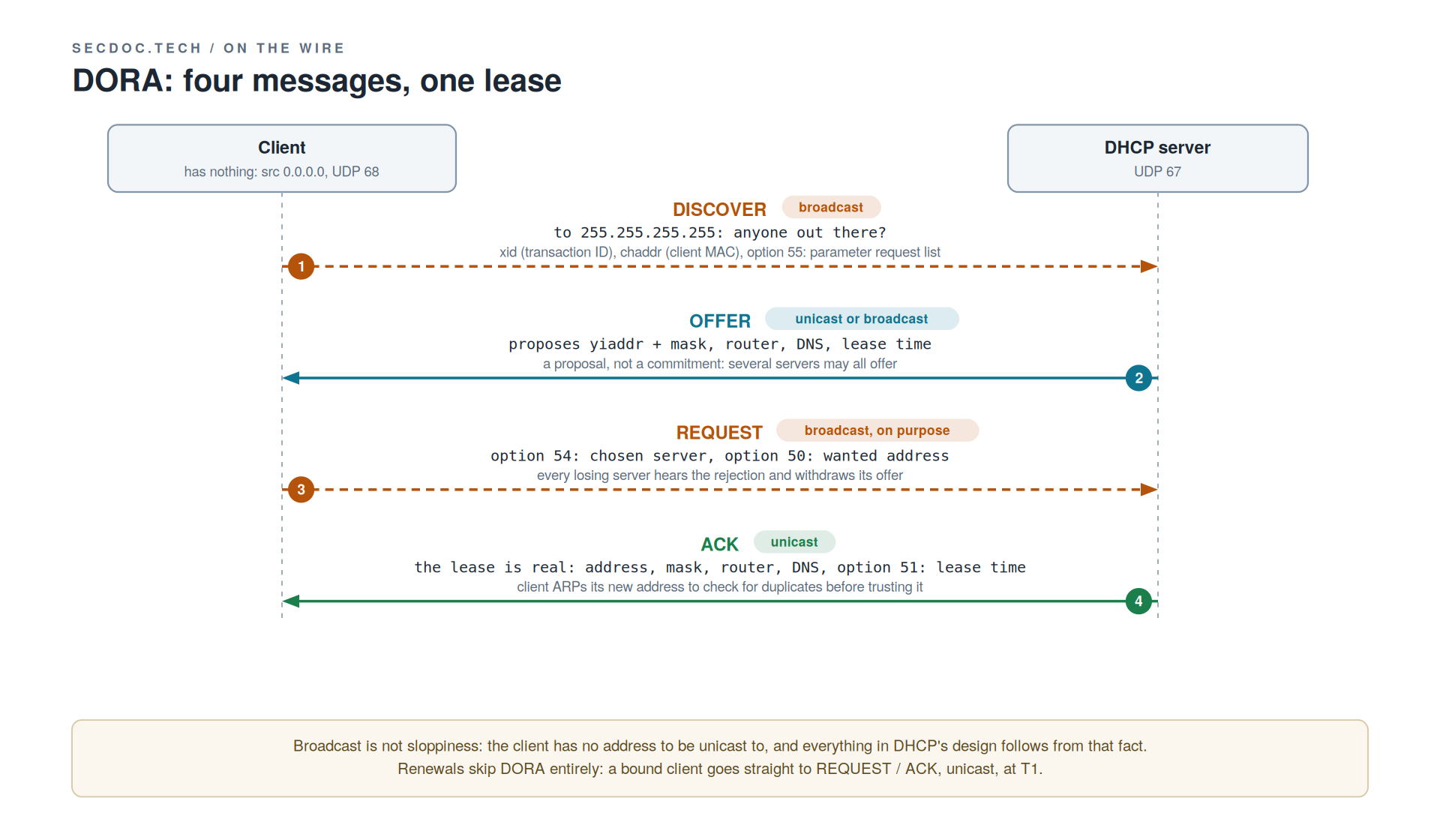
Everything about DHCP's design follows from one fact: the client has no address, so it cannot be unicast to. Broadcast is not sloppiness; it is the constraint.
DISCOVER goes to 255.255.255.255 from source 0.0.0.0, client UDP 68 to server UDP 67, carrying the transaction ID (xid) that ties the four messages into one exchange, the client MAC in chaddr, and option 55, the parameter request list. Any server on the segment may answer with an OFFER proposing an address (yiaddr) plus mask, router, DNS, and lease time. An offer is a proposal, not a commitment, and several servers may all offer (the offer itself returns unicast to the client's MAC or broadcast, per the client's broadcast flag). The client then broadcasts its REQUEST even though it could now reach its chosen server directly, and the reason is the moment multi-server DHCP starts making sense: the Request names the chosen server (option 54) and the wanted address (option 50) precisely so every losing server hears the rejection and withdraws its offer. The ACK makes the lease real: address, mask, router, DNS, lease time (option 51). The client then ARPs its new address to check for duplicates before trusting it.
Two message types outside the acronym that the lab will show you: the client DECLINEs if its duplicate-ARP check fails, and the server NAKs a Request it cannot honor, classically a machine waking on a new subnet asking for its old address, NAK'd back to square one. And one pre-emption, the most common student error in this half: renewals are not DORA. DORA is the cold-start path only; a renewing client goes straight to REQUEST/ACK, unicast.
The lease is a clock: T1, T2, and the cliff
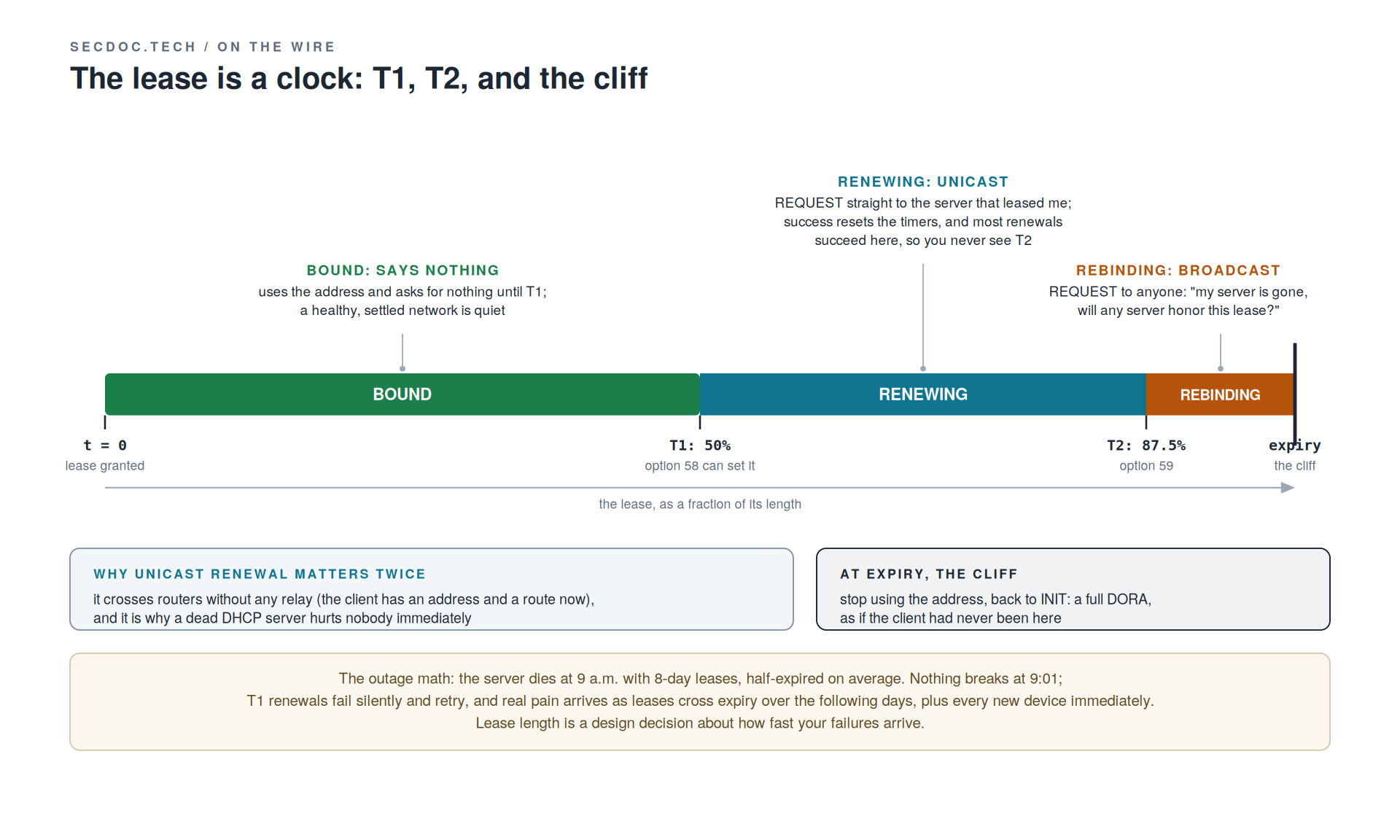
The state names come straight from RFC 2131: INIT, SELECTING, REQUESTING, BOUND, RENEWING, REBINDING, laid on the clock. A bound client uses its address and says nothing, which is why a healthy, settled network shows almost no DHCP broadcast traffic in a capture; broadcasts on a quiet segment mean cold starts or trouble. At T1, half the lease by default (option 58 sets it explicitly), the client unicasts a REQUEST to the specific server that leased it; renewal succeeds, timers reset, and most renewals succeed here so you never see T2. The unicast detail matters twice: it is why renewals cross routers without any relay (the client has an address and a route now), and it is why a dead server hurts nobody immediately. At T2, 87.5% by default (option 59), the client escalates to broadcast: "my server is gone, will anyone honor this lease?" At expiry, the cliff: stop using the address, back to INIT, full DORA.
Now the outage math that gives "slow motion" its mechanics. Your DHCP server dies at 9 a.m. with 8-day leases, half-expired on average. Nothing breaks at 9:01. T1 renewals start failing silently and retrying; real pain arrives as leases cross expiry over the following days, plus every new device immediately. Eight-day leases buy days of grace; the 1-hour leases typical of guest Wi-Fi land the outage within the hour. Lease length is a design decision about how fast your failures arrive. Choose it knowing that.
Scopes, reservations, and the options that bite
A scope is one subnet's pool of leasable addresses plus the options that ride with it, with exclusions carving out infrastructure space inside the range. Pool size, device count, and lease length are one equation, and guest networks are where it fails: offices rarely exhaust scopes, lunch crowds do.
Know the everyday options by number, because captures, configs, and vendor docs all use the numbers: 1 subnet mask, 3 router, 6 DNS servers, 15 domain name, 51 lease time. The ones that bite are 43 and 60, vendor-specific: PXE boot, IP phones, and wireless APs finding controllers all ride there, and the pain pattern is always the same. The new batch of APs boots, cannot find its controller, the network "works fine" for everything else, and nobody thinks DHCP for an hour. Options ride the scope, so one mistake is inherited by every client on the subnet at renewal.
Reservation versus static, argued. A reservation has the server hand a fixed address to a specific MAC: config stays central, options still flow, the lease table stays the one auditable source of truth. Static survives a DHCP outage and exists before DHCP answers, and that independence is the disqualifying test, not preference: anything that must be reachable while DHCP is down, or before it is up, cannot depend on it. The DHCP server cannot lease itself an address. So the honest line: routers, servers, and the DHCP/DNS boxes themselves go static; printers and controlled endpoints do fine on reservations; purity in either direction costs more than it returns. The rule underneath generalizes: walk your dependency graph and make sure it has a floor.
Across a routed network: the relay and giaddr
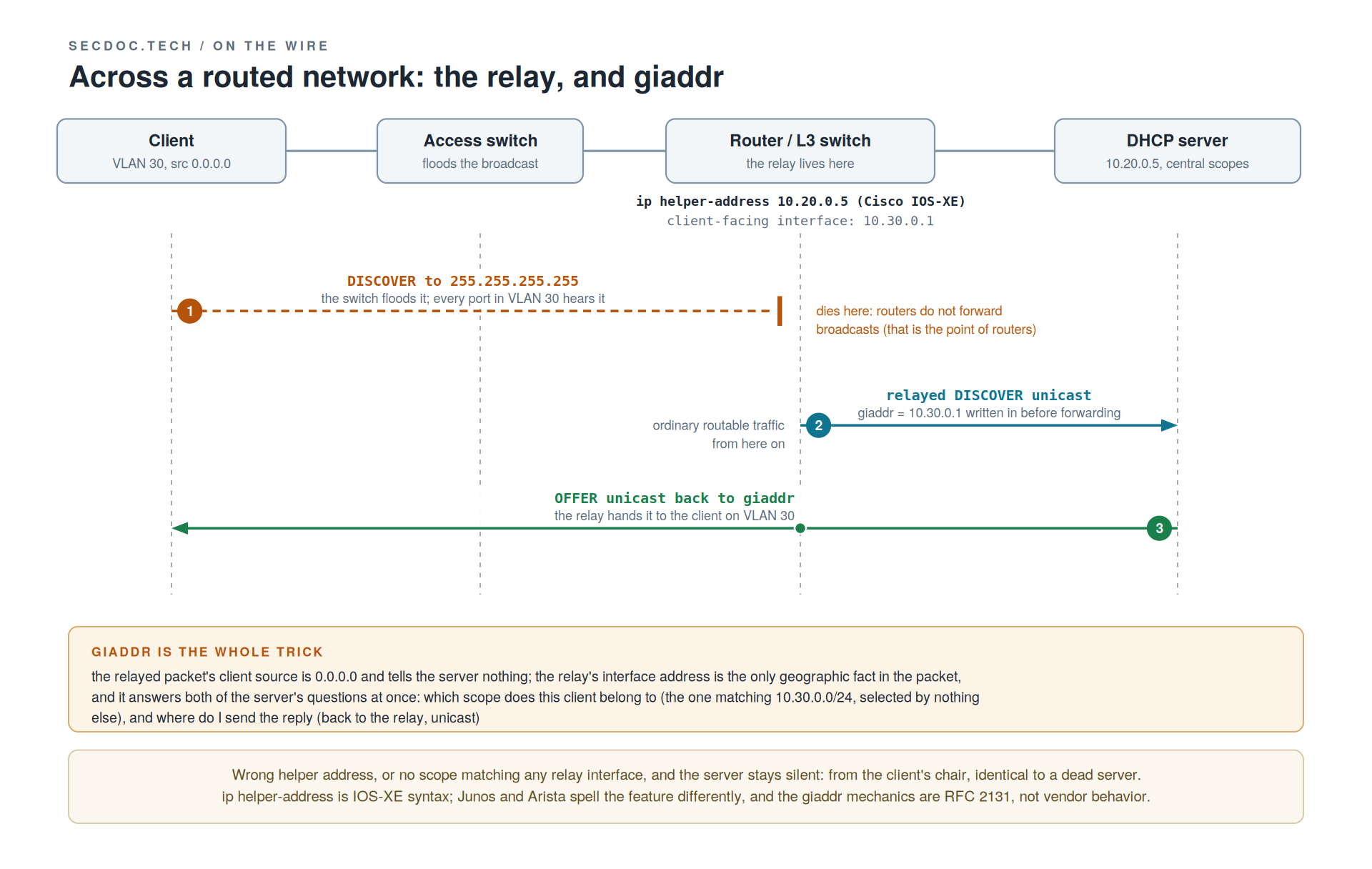
Students quietly assume one DHCP server per subnet; real networks run two central servers for a whole campus, and the relay is the mechanism. Routers do not forward broadcasts; that is the point of routers. So a relay on the client's layer 3 gateway (ip helper-address on Cisco IOS-XE; Junos and Arista spell it differently, and the mechanics are identical everywhere because they are RFC 2131, not vendor behavior) picks up the broadcast DISCOVER and re-sends it unicast to the configured server, ordinary routable traffic from there on.
Before forwarding, the relay writes its receiving-interface address into giaddr, the gateway address field, and that one field is the whole trick. The client's own source is 0.0.0.0 and tells the server nothing; giaddr is the only geographic fact in the packet, and it answers both of the server's questions at once: which of my forty scopes does this client belong to (the one matching giaddr's subnet, selected by nothing else), and where do I send the reply (back to the relay, unicast). Wrong helper address, or no scope matching any relay interface, and the server stays silent, which from the client's chair looks identical to a dead server. Hold that for the ladder. One platform note: IOS-XE's helper forwards several UDP broadcast types by default, not just DHCP; trim the list on security-sensitive segments.
Availability: designing for the slow-motion outage
Two patterns dominate, argued by failure mode. Failover peers share one pool and synchronize lease state over a failover protocol (ISC dhcpd and Kea have one, Windows DHCP its own); either peer can renew any lease, so clients never notice a dead server. The cost: the sync channel is one more thing to run, monitor, and un-wedge, and split-brain recovery on a failover pair is genuinely unpleasant. Split scopes take the opposite trade: two servers, no shared state, each owning a disjoint slice, classically 80/20. Nothing can split-brain because there is no brain to split, but the survivor holds no record of the dead server's leases and 20% of a pool exhausts fast: simplicity now, capacity and continuity risk during the exact failure you built for. Small stable sites do fine on split scopes; anywhere leases are short or pools tight, run failover.
The lease database is state, and it deserves state's discipline. A server that boots with an empty database and a full pool will happily offer an address someone is still using. Decent servers probe with ping or ARP before offering and clients decline after their own ARP check, but "the protocol mostly self-heals a duplicate" is not a backup strategy. Back it up, know the restore, and know your platform's behavior on a lost database (Kea and Windows differ), then test it.
v6 changes the deal
IPv6 separates "get an address" from "find the router." Router Advertisements, sent by routers rather than servers, always carry the default gateway and on-link prefixes; address assignment then happens by one of two methods, chosen by flags in that same RA. A-flag on a prefix: SLAAC, the host builds its own address, no server, no lease, nobody keeping a table, and DNS can even arrive in the RA itself (RDNSS), so a small network needs no DHCPv6 at all. M-flag: stateful DHCPv6, addresses from a server, leases and a table again, which audit-minded shops want. O-flag: address by SLAAC, other configuration from DHCPv6. DHCPv6 runs on UDP 546/547 and clients identify by DUID, not bare MAC.
The claim to repeat until it sticks: DHCPv6 never hands out a gateway. No gateway option exists, on purpose. The router is the authority on how to reach routers, and a v6 host's default route comes from the RA's source, a link-local address, another surprise for anyone reading route tables the v4 way. Operationally, SLAAC means addresses nobody assigned and no lease table to consult: fine at home, a real audit gap for enterprises, and a big reason stateful DHCPv6 persists there. Rogue RA is v6's cousin of rogue DHCP, and RA Guard is the access-layer answer, the same shape as the snooping story next. Endpoint support for every flag combination is uneven across operating systems; verify current client behavior before building a design on it.
Standards note, verified at publish: DHCPv6's current specification is RFC 9915 (January 2026), which obsoletes RFC 8415 (which obsoleted the original RFC 3315). Among other cleanups, 9915 drops temporary addresses (IA_TA) and the server unicast capability. If your references still cite 8415, that is your cue to re-read the datatracker.
DHCP's trust problem: anyone can answer a broadcast
The protocol has no notion of an authorized server. Any box on the VLAN may answer a DISCOVER, and the client believes whichever acceptable offer arrives. A rogue's offer hands out its own gateway and DNS: an instant on-path position for every client it wins, or a floor-wide outage, depending on intent. In current ATT&CK terms this is T1557.003, Adversary-in-the-Middle: DHCP Spoofing (Enterprise, v19.1, verified at publish), and the technique covers both the redirection case and the exhaustion case below. Hold the malice loosely, though, because usually there is none: a home router plugged into a conference-room jack backwards does identical damage. I lost two hours to exactly that once. Somebody's personal router handed out its own gateway and took a floor off the network, every symptom pointed at the WAN, and the fix took five minutes once someone asked the question nobody's mental model contained: who answered the lease request?
Starvation is the volume attack: flood DISCOVERs from forged MACs until the pool is empty and legitimate clients get nothing. Step two writes itself: with the real server exhausted, the attacker's rogue is the only voice left. It is cheap to run and loud in the lease table; a full scope of one-minute-old leases is the signature.
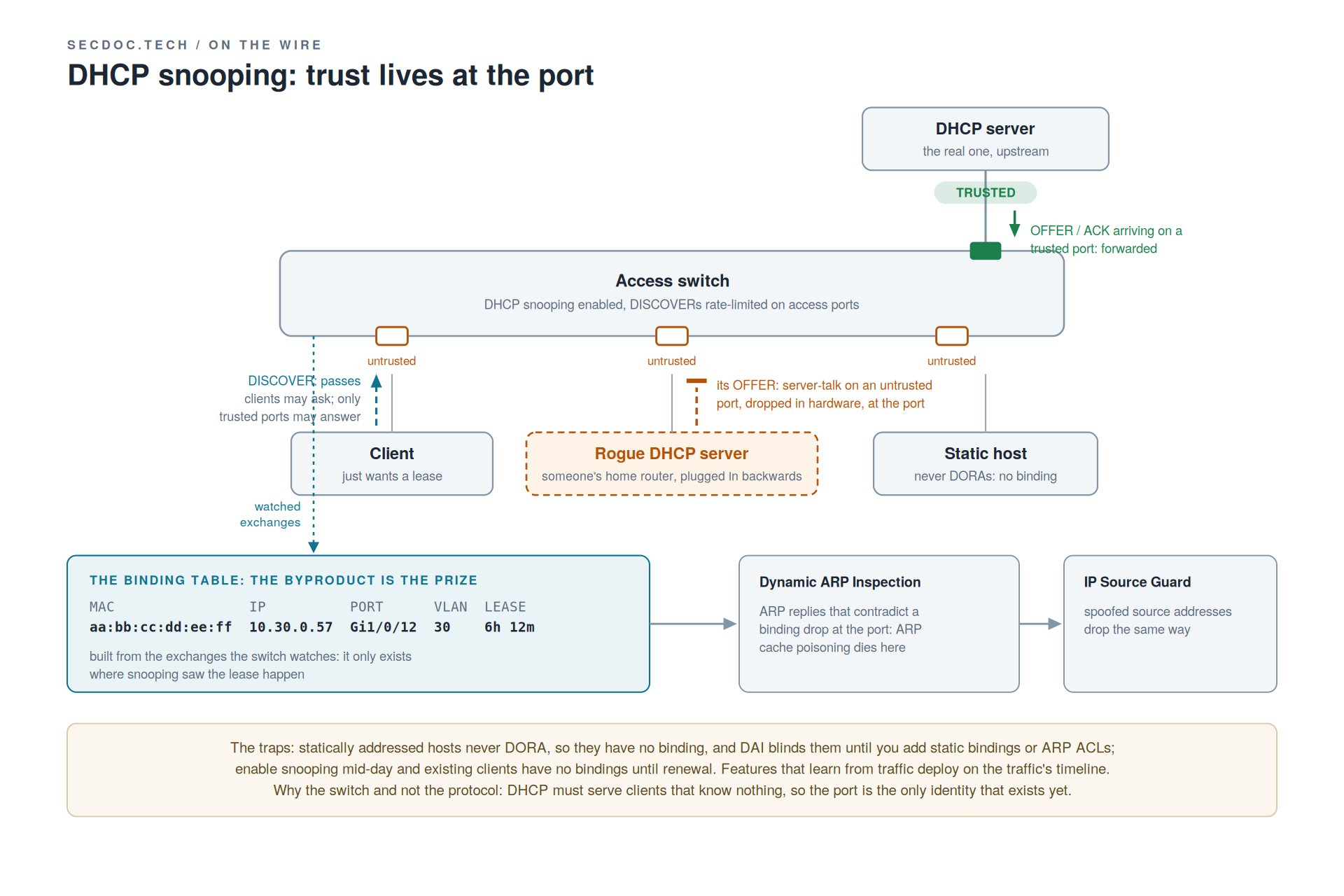
The defense lives at the switch, and the reason it lives there rather than in the protocol is the most architectural sentence in this post: DHCP must serve clients that know nothing, so authentication has no anchor at first contact. The port is the only identity that exists yet, so the port is where trust lives. DHCP snooping implements exactly that: mark the ports facing real servers, and the uplinks toward them, trusted; Offers and ACKs arriving on any untrusted port drop at the ASIC. Rate-limit DISCOVERs on access ports and starvation gets expensive.
The byproduct is the prize. Snooping builds a binding table from the exchanges it watches: MAC, IP, port, VLAN, lease. That table becomes ground truth for two more features: Dynamic ARP Inspection drops ARP replies that contradict a binding at the port, which is where ARP cache poisoning dies, and IP Source Guard drops spoofed source addresses the same way. One feature's bookkeeping becomes two more features' enforcement data, and the dependency direction is the teachable structure: DAI is only as good as the binding table, and the binding table only exists where snooping watched the lease happen.
That dependency is also the trap that bites real deployments. Statically addressed hosts never DORA, so they have no binding; turn on DAI and they go dark until you add static bindings or ARP ACLs. Same family: enable snooping mid-day and existing clients have no bindings until renewal. Features that learn from traffic must be deployed on the traffic's timeline. Whenever "we hardened the access layer last weekend" and "new machines can't connect" arrive in the same week, you already know. The chain composes with the rest of access-layer hardening (port security, 802.1X, storm control); I treat that layered composition, and the architect's discipline of choosing which control earns its operational cost, in [chapter ref] of the Cybersecurity Architect's Handbook.
Work it through: fine all morning, broken after lunch
A user VLAN runs clean all morning. After lunch, new devices cannot get an address, while everyone already connected hums along. Walk through your diagnosis order, and first, explain the mechanics of why the connected users are fine.
Work the second question first, because it is the giveaway.
Connected users hold bound leases: they need nothing from DHCP until T1, and even failed renewals degrade gracefully toward T2 before anything user-visible happens. New devices need a full DORA right now. The symptom split maps exactly onto the lease lifecycle, and being able to say so is proof the timer section landed.
Then the order, with the timing clue doing work: something changed at midday. Candidates, roughly by likelihood: scope exhaustion from a lunch crowd of guest and returning devices (pull the lease table and read the ages; a scope full of fresh short leases says starvation or an undersized pool), a snooping or trust change pushed in a midday window (the security feature causing the outage it prevents, always by deployment error), a helper address lost in a router change (server silence that looks identical to a dead server, courtesy of giaddr), or a pool undersized for the after-lunch return wave. The sharp instinct is to ask for the lease table before touching a switch. Reward that instinct in yourself.
The diagnostic ladder: no address at all
"No address" is a total failure for that client, and total failures get bottom-up sweeps. Each rung is cheap, and each failure fully explains the symptom, so stop at the first hit.
First, read the tell, because there are two. An interface with no address and no link is a physical or VLAN problem: rung 1. A client sitting on 169.254.x.x is a different message entirely, and as a diagnostic it is a gift: APIPA self-assignment means the DHCP client ran, sent its DISCOVER, and heard silence. The client-side stack worked; skip half the ladder, because the problem is the path or the server, not the machine in front of you. On Windows, ipconfig /release then /renew re-runs the exchange while you capture it.
Rung 1, physical and VLAN: link up, port in the VLAN you think, trunks tagging it through. A DISCOVER that never leaves the port needs no further analysis.
Rung 2, snooping and trust: snooping enabled with the server path trusted? An untrusted uplink eats every Offer: the switch causing the outage it was configured to prevent.
Rung 3, the relay: helper address present on the client-facing SVI, server reachable from the relay, a scope matching giaddr. Silence at any of these looks identical to a dead server.
Rung 4, scope exhaustion: lease table full? Read the ages; fresh, short, uniform leases across the scope say starvation or undersizing. Check before blaming the service.
Reading a lease table is its own small skill: find the MAC, read its state and expiry. A client you expected and do not find never completed DORA, and the ladder tells you where it died.
The NTP Part: The Clock Under Everything Else
The doorbell that logs visitors an hour early and the Kerberos lab that locks out a class are the same lesson at two depths: the clock was wrong, and nothing said so. Nobody requests a lecture on time; they request it after the outage where nothing lined up. So this part opens the way the class does, by making the dependency concrete.
Why time is infrastructure
Five things in every environment break when the clock is wrong. Log correlation: every SIEM joins events from different systems by timestamp, and clocks that disagree either split one incident into two or hide the ordering that explains it. Kerberos: Active Directory rejects authentication tickets outside a five-minute skew by default, so a domain controller with a slow clock locks out the very users it authenticates, and the error message says nothing about time. Certificates: TLS validity is a window with a start and an end, and a wrong clock reads a good certificate as expired or not yet valid. Scheduled work: cron jobs, backups, batch runs, and certificate renewals all fire on the clock, and drift moves them, overlaps them, or skips them without warning. Distributed ordering: databases and clusters decide which write wins by time, and disagreeing clocks corrupt the sequence the whole system depends on. Every one of those is a security or integrity control that silently depends on the clock. Time sync is not a nicety.
The exchange: four timestamps, two formulas
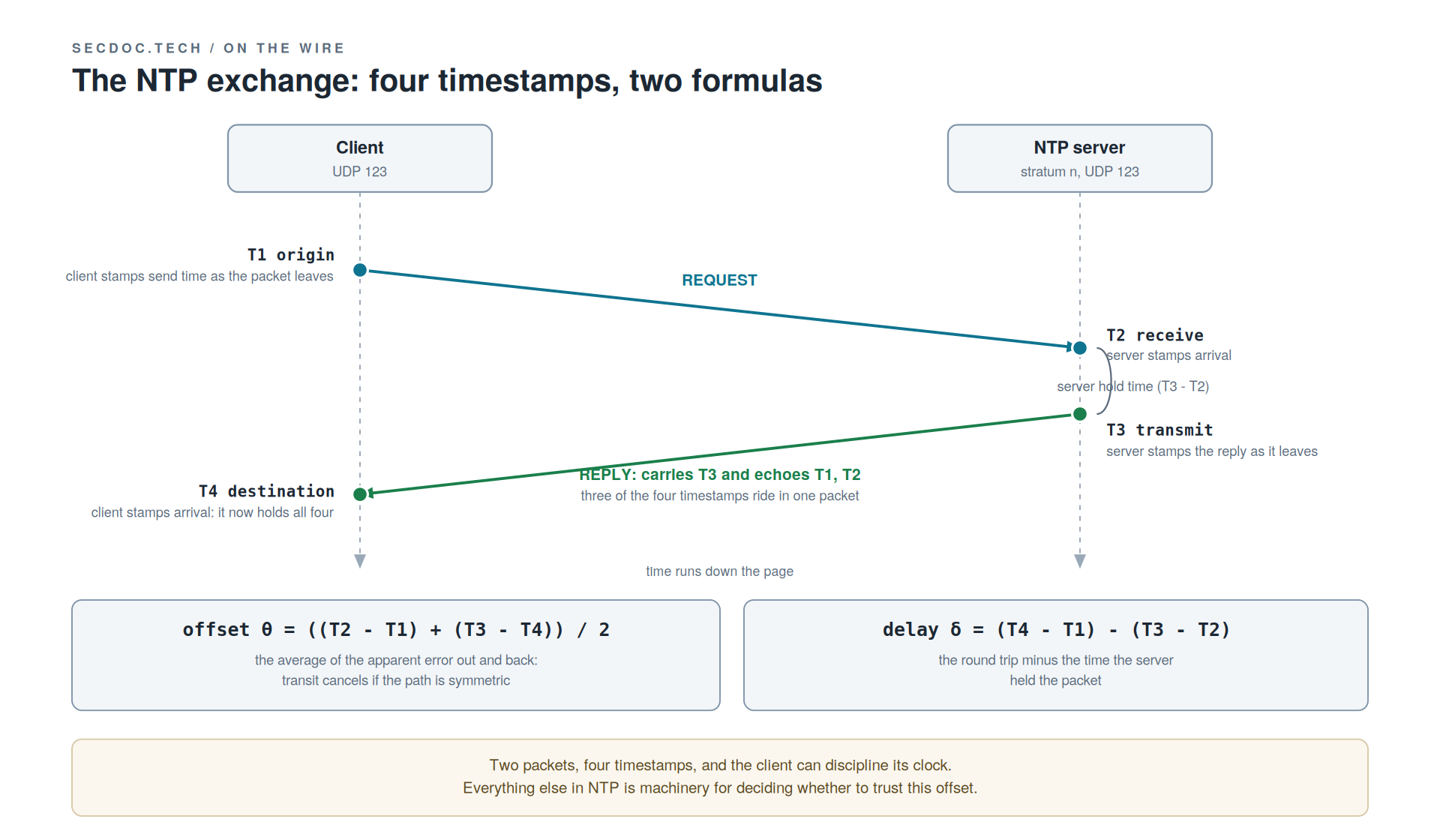
The whole protocol is four numbers and two formulas, and everything else in this part is machinery for deciding what to do about what they produce. Both sides speak UDP 123. The client writes T1, the origin timestamp, into its request as it leaves: my clock reads this on the way out. The server records T2 the instant the request lands and writes T3 as its reply leaves, and here is the detail students miss: the reply echoes T1 and T2 back inside it, so three of the four timestamps travel in one packet. The client stamps T4 on arrival and now holds all four.
The formulas, derived in plain language. Offset: θ = ((T2 - T1) + (T3 - T4)) / 2. That is the average of how far off the clock looked on the way out and on the way back, and averaging cancels the transit time if the path is symmetric. Delay: δ = (T4 - T1) - (T3 - T2). That is the total round trip minus the time the server spent holding the packet. Two packets, four timestamps, and the client can discipline its clock. The honest caveat rides with the math: the offset formula assumes the path is symmetric in each direction, and asymmetric routing is exactly where NTP accuracy quietly degrades.
Stratum: distance from a reference clock, not accuracy
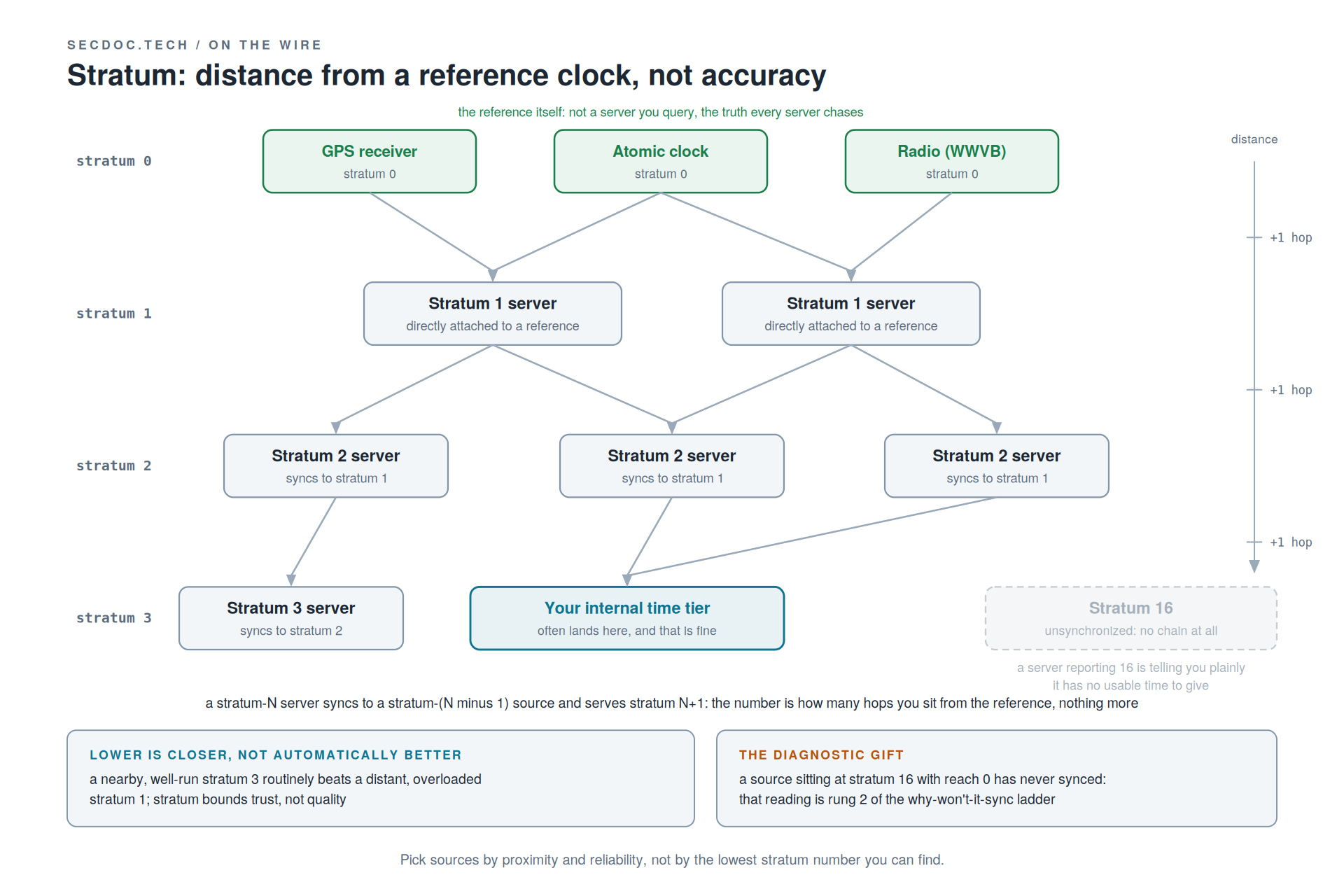
Say this one out loud until it sticks, because it is the most persistent misconception in the room: stratum is distance from a reference clock, not a measure of accuracy. Stratum 0 is the reference itself, a GPS receiver, an atomic clock, a radio signal; it is not a server you query, it is the truth every server chases. A stratum-1 server is directly attached to a stratum-0 source, and everything below counts hops: a stratum-N server syncs to a stratum-(N minus 1) source and serves stratum N+1. Lower is closer, not automatically better. A nearby, well-run stratum 3 routinely holds tighter time than a distant, overloaded stratum 1 across an asymmetric path; stratum bounds how much trust the chain can carry and says nothing about the offset you will actually measure. Pick sources by lowest stratum number and you will build worse designs than someone picking by proximity and reliability. And stratum 16 is the reserved value for unsynchronized: a source reporting it is telling you plainly that it has no usable time to give, a diagnostic gift that pays off in the ladder.
Clock discipline: slew, step, and when NTP refuses
NTP is a governor on the clock's rate, not a clock-setter. It would rather run your clock a few parts per million fast for a minute than yank it and make time jump, and the reason is monotonic time: databases, logs, and locks assume time never runs backward, and a backward step can duplicate a key, reorder a log, or expire a lease early. Below the step threshold (128 ms in the reference implementation) NTP slews, changing the rate rather than the reading; above it, it steps the clock directly, on a policy you can tune. The panic threshold, near 1000 seconds, is the refusal point worth memorizing: a clock seventeen minutes off is treated as a symptom rather than a rounding error, and the daemon stops rather than "fix" it blind. That is exactly why a VM restored from an old snapshot sometimes will not sync until you step it by hand or start the daemon with the flag that permits the big initial jump.
Two more pieces of the discipline loop explain real tickets. The drift file records your oscillator's bias, the parts per million it gains or loses, so after a restart the daemon disciplines correctly in minutes rather than relearning the correction from scratch; a freshly rebuilt host that takes forever to settle usually lost exactly this, and chrony's reputation for fast convergence is largely better handling of this case. And the poll interval is adaptive: it starts tight, tens of seconds, and widens toward 1024 seconds as the clock proves stable, so good discipline costs less traffic over time.
Sources and the implementation map
The source-count argument fits in one sentence you should be able to say back: one source is faith, two is a tie you cannot break, three can outvote a falseticker, and four is the working floor. One source wrong means you are wrong and nothing tells you so. Two disagreeing sources give you no way to pick. Three let the majority discard a falseticker, a source that is reachable, low-stratum, and confidently wrong (a misconfigured server, a bad reference, or an attacker). Four holds you at three honest sources while one is down for maintenance: design for the source you will lose, not the ones you have. How the vote works, at orientation depth only: each source offers not a single time but an interval, widened by the measured round-trip delay; the algorithm finds the overlap where a majority of intervals agree, drops any source whose interval misses it, then clusters the survivors and disciplines toward the tightest agreement. You do not need the algorithm's internals to run NTP well. You need to feed it enough honest sources that the vote actually means something.
The implementation map, vendor-neutral on purpose, so you can walk into any shop and predict behavior. SNTP is one-shot: ask, set, done, no discipline loop and no source selection, fine for an appliance that only needs to be roughly right. Full NTP runs the loop continuously; same protocol on the wire, and the difference is whether anything disciplines the clock over time. Among the daemon families, treat the names as categories: the ntpd lineage is the reference implementation and the source of most behavior described here; chrony re-syncs fast after downtime and copes with clocks that jump, built for VMs, laptops, and intermittent links, which is why it is now many distros' default; systemd-timesyncd is the minimal SNTP-class client that chases one source, sets the clock, and stops. Matching the tool to the environment is the skill.
Windows deserves its own paragraph for anyone heading into an enterprise. W32Time in a domain is a hierarchy that mirrors AD, not a free-for-all: members sync from a domain controller, DCs sync upward, and the PDC emulator of the forest root domain is the apex. That one clock must point at good external sources; set it there and the whole domain inherits correct time. Hand-configure external NTP on a member server and you have created a second master that fights the hierarchy. And one honest line about the precision cousin: NTP lives in the millisecond world, and when milliseconds stop being enough (trading, telecom, some industrial control), PTP (IEEE 1588) disciplines to sub-microsecond with hardware timestamping. Name it so you know where NTP's promises end; it is a different design conversation.
Design: a small tier everything chases
The design pattern deliberately rhymes with the DNS resolution chain: build a small controlled tier that everything else depends on, and know the chain before the outage. A handful of internal time servers form the tier, every internal host points at the tier and never straight at the internet, and the tier chases a small, deliberate set of external sources. Source policy is a real decision, not a default a config shipped with: a public pool is easy and diverse but anonymous, a vendor pool ties you to one operator's health, a national-laboratory server is authoritative but deserves a good citizen's query rate, and this is the source-count math applied to the tier's own upstreams, so pick more than one on purpose. Where accuracy or independence earns the cost, give the tier its own GPS-disciplined reference so the organization's time does not hang on internet reachability; most shops do not need GPS, they need a deliberate tier instead of a default. The egress rule follows: allow UDP 123 outbound from the time tier only. Every host reaching the internet for its own time is both an operational and a security smell, because a thousand independent sync states are a thousand unauthenticated UDP conversations you can neither see nor fix, and the fix is one rule that is trivial to write and rarely written.
Two failure modes dominate real time tickets. The virtualization trap: the hypervisor's guest tools sync the VM to the host while the guest's own NTP disciplines it too, two masters correcting one clock in opposite directions, and the result is a clock that jumps and drifts for no visible reason. The one-master rule: host-based sync or in-guest NTP, pick exactly one (chrony exists partly because guests pause, migrate, and jump, and it recovers better). And the domain-agreement failure: AD's time hierarchy and the network's NTP design have to point at the same apex, and when someone hand-sets external NTP on a member, the domain and the network carry different time and Kerberos starts refusing tickets across the seam, presenting as an authentication problem rather than a time problem.
The failure shape is the post's third variation on a theme it has now played twice. Time fails the way DHCP does, in slow motion, but quieter: clocks slide apart by seconds, then minutes, no alert fires because every service still answers, and then it all goes at once, Kerberos refusing tickets, certificates reading as expired, log timelines diverging, three failures on one hidden cause. The design answer is the same as DHCP's: monitor the leading indicator. Watch offset per host and alert on the trend, because "NTP is up" is not synced, and synced is not "offset within tolerance." Monitor the number, not the daemon's pulse. Time integrity is also a dependency of the monitoring architecture itself, since every correlation your SIEM performs assumes the clocks agree; I treat that dependency, and where it sits in the visibility stack, in [chapter ref] of the Cybersecurity Architect's Handbook.
Attacking time
Plain NTP is unauthenticated UDP, so whoever answers with a plausible reply can move a target's clock, and time is a control input, not a display. Shift a clock and the damage lands downstream: certificates read as expired or not yet valid, Kerberos rejects tickets over skew, TOTP codes fail, scheduled jobs fire early or never. Worse, corrupt time corrupts evidence: log timelines stop lining up, so the record you would use to investigate the intrusion is itself unreliable. On-path attackers do this quietly by altering timestamps in transit; off-path attackers race forged replies, the same shape of race as DNS spoofing. The adjacency worth naming for anyone doing forensics: attackers also manipulate timestamps directly, file by file, which ATT&CK catalogs as T1070.006, Indicator Removal: Timestomp (now under the Stealth tactic after v19's Defense Evasion split; verified at publish). Shifting a clock corrupts the timeline wholesale where timestomping does it retail, and both attack the same thing: the integrity of the record.
Amplification is the historical DDoS lesson. NTP's old monlist query returned a long list of recent clients from a tiny request, so spoofing the victim's address as the source and spraying small queries at many public servers drowned the victim in large replies it never asked for, with amplification factors in the hundreds driving real campaigns. The fix was structural: mode 6 and mode 7 monitoring and control queries are restricted or off by default in current daemons, and monlist is gone. The posture that follows generalizes: answer time queries, refuse management queries, rate-limit. Your NTP service should do one job for strangers and nothing else, and most NTP CVEs live in the management surface, not the time exchange.
Authentication, honestly staged, the same way I staged DNSSEC. Symmetric keys are the legacy floor: a shared secret proves a reply came from a server holding the same key, real protection whose key distribution does not scale past a handful of hosts. Autokey was the attempt at public-key NTP authentication, and it is deprecated and known-broken: build nothing new on it, retire it where you find it. NTS, Network Time Security (RFC 8915), is the modern answer: a TLS handshake establishes keys, and those keys then authenticate ordinary NTP packets without paying TLS on every exchange. Support is still filling in across servers, clients, and pools, so verify current coverage before designing around it, the same discipline as the DNSSEC numbers earlier. The defensive posture in one paragraph: authenticate the handful of sources your internal tier trusts rather than every host's every query, restrict query modes everywhere, make the tier the trust boundary so nothing inside ever reaches the internet for time, and watch offset as a security signal as well as an ops metric, because a clock drifting on a schedule you did not set is worth a second look.
Step back for the framing that closes the security layer of all three parts. DNS (1983), DHCP (1997, on 1985's BOOTP framing), and NTP (1985, BOOTP's contemporary) predate the threat model they now live in, and none of them can grow authentication at the protocol layer without breaking the installed base: DNS because billions of resolvers and authorities must interoperate, and DNSSEC's two-decade deployment curve shows what retrofitting costs; DHCP because its whole job is serving clients that possess no identity to authenticate with; NTP because the world's clocks already chase it unauthenticated, which makes NTS its own DNSSEC-shaped retrofit story, correct in design and arriving decades after the installed base set the defaults. The compensating controls exist precisely because the protocols cannot be fixed in place. Source-port randomization, DNSSEC where deployed, protective DNS, resolver egress control, snooping, DAI, RA Guard, restricted query modes, the authenticated time tier: each is an architectural answer to a protocol-level gap. That is not a criticism of the protocols. It is the normal condition of infrastructure that outlives its era's assumptions, and recognizing the pattern is most of the architect's job.
Work it through: ninety seconds apart
Your SIEM shows the same event from two systems, ninety seconds apart. Before reading on, walk through what you now distrust, and what you check first.
Take the minute. The scenario is under-specified on purpose, because saying what you distrust comes before acting.
What a good answer distrusts, in order: first, the correlation itself, because if two clocks disagree, "the same event ninety seconds apart" might be one event or two, and you cannot tell yet. Second, the log timelines, because every downstream conclusion about sequence is now suspect, and reconciling the logs by timestamp before checking the clocks bakes the error into the record. Third, your own assumption about which clock is wrong: "one system lagged" assumes the answer, and the fix is to measure, not average. What you check first, concretely: offset on both hosts against a trusted source, ntpq -p or chronyc tracking on each, compared to the internal tier. The evidence point this lands is the reason time closes the post: bad time does not just break things, it corrupts the record you would use to debug everything else. And the sharp connection to make out loud: ninety seconds of skew is already in the neighborhood of Kerberos's five-minute tolerance, so ask what else in that environment is silently degrading at the same offset.
The diagnostic ladder: why won't it sync
Read the instruments before touching anything, in a fixed order, the same way the DNS half taught dig: tally, reach, offset, jitter. In ntpq -p, the tally code in the first column is the verdict: the asterisk marks the source being disciplined to (chosen by the vote, not by lowest stratum), the plus marks a candidate the vote kept, the minus marks a falseticker the vote rejected, and blank means unreachable or discarded. reach is an eight-bit octal history of the last eight polls: 377 means all eight answered, 0 means nothing is getting back, and a value climbing 1, 3, 7, 17 is a source recovering as answers shift into the register. offset is how far off this source says your clock is, the number the discipline loop steers toward, and jitter is the scatter in recent offsets: a noisy, distant source gets outvoted even when reachable. chronyc sources tells the same story under different headers. A source at stratum 16 with reach 0 has never answered at all, and that reading points straight at the first rung.
Rung 1, reachability on 123: is UDP 123 open outbound to the source? reach stuck at 0 means the poll never gets an answer, and the most common cause is an egress or firewall rule nobody associated with time. Start every diagnosis here.
Rung 2, source stratum sanity: is the source actually synced, or sitting at stratum 16? A server with no usable time of its own has none to give you.
Rung 3, offset beyond the panic threshold: a huge initial offset, a thousand seconds or more, makes the daemon refuse to step and just sit, looking connected and never converging. A restored snapshot or a dead RTC battery is the classic setup; the fix is a manual step or a start that permits the big first jump.
Rung 4, discipline state: is the loop slewing, holding, or panicked? chronyc tracking and ntpq -c rl show what the discipline is doing, not just who it is talking to, which is the difference between working slowly and stuck.
The tells that name a problem as time before you ever open the ladder: Kerberos "clock skew too great" or a Windows time-difference event (authentication failing on skew is time telling you the story, so check the clock before touching AD), a VM whose clock drifts or jumps after a pause, migration, or snapshot restore (virtualization is the usual suspect and the one-master rule the usual fix), and TLS failing with "certificate not yet valid" on an otherwise healthy host (a clock in the past reading good certificates as premature). And the live proof, worth running once so the octal register stops being an abstraction: break it on purpose by blocking 123 outbound, watch reach pin at 0, remove the rule, and watch it climb 0, 1, 3, 7, 17, 377 as each successive poll lands.
Three Services, One Operational Rule
DNS trusts caches to honor TTLs, delegations to stay correct, and the resolver to be who you think it is; it breaks loudly and lies, claiming everything is down while ping-by-IP works fine; its first question is who answered this query, cache or authority, answered by watching the TTL. DHCP trusts an honest broadcast domain, relays carrying giaddr faithfully, and lease state surviving the server; it breaks quietly on the lease clock, bound clients riding while new clients starve and 169.254 spreads; its first question is who answered this DISCOVER, and whether anything answered at all, answered by watching the ports. NTP trusts a few honest sources, a sane stratum path, and discipline acting before the panic threshold; it breaks silently on the drift curve, clocks sliding apart until authentication and log integrity fail together; its first question is what is my offset, and which source am I actually disciplined to, answered by reading the tally and the reach.
The rule all three parts have been building toward: know your resolution path, your lease path, and your time source chain before the outage, because during it is too late. Sit down some quiet afternoon and write all three for your network. Resolution: stub, to which resolver, forwarded where, authoritative where. Lease: client port, trusted path, relay, which server, which scope. Time: host, to which tier server, which upstream sources, which reference. Three diagrams, twenty minutes, and the next outage starts with you holding a map while everyone else holds a symptom.
The lab that makes it stick
Everything in this post is checkable against a capture you can take tonight on hardware you already own, which is this site's standing argument about how the discipline gets learned. Stand all three services up in the homelab: BIND or Unbound for DNS, Kea or dnsmasq for DHCP, chrony for NTP, a couple of VMs and an evening. Capture as you go with tcpdump or Wireshark, filters port 53, port 67 or port 68, and port 123. Watch a cold resolution walk, then the cached second pass with its counted-down TTL. Watch a full DORA, then a T1 renewal arriving as quiet unicast. Watch the four-timestamp exchange, then the offset settle. Then break it on purpose: pull the helper address, poison a TTL, exhaust the scope, untrust an uplink, block 123 outbound, and read each failure in the capture. For time specifically: point a host at your own chrony server, force an offset by setting its clock wrong, and watch the discipline pull it back in the logs and the capture, reach climbing from 0 to 377 as each poll lands. The failures look identical from the desktop and completely different on the wire, which is the entire argument for the capture. DORA stops being an acronym you memorized and becomes four packets you have watched, and the offset shrinking in the log is the moment time stops being abstract too.
If you want to build out your own DNS infrastructure past the lab exercise, I have a full walkthrough of setting up Pi-hole with Unbound, which gives you filtering and your own recursion on hardware you already own. Or consider picking up my Cybersecurity Architect's Handbook, Second Edition and standing up Technitium instead: same discipline, different toolchain.
For the reading list, go to the sources: RFC 1034 and 1035 for DNS concepts and specification (the originals, extended by dozens of RFCs since), RFC 2308 for negative caching, RFC 4033, 4034, and 4035 for the DNSSEC suite, RFC 2131 for DHCPv4 (DORA, the timers, and giaddr all live there), RFC 9915 for DHCPv6, RFC 5905 for NTPv4 (the four timestamps and the discipline live there), and RFC 8915 for NTS. RFC status shifts, as 9915's arrival this January demonstrates, so check the IETF datatracker before citing any of them in coursework.


