


A guest network can look finished before it has done any security work.
The usual signs are familiar: a separate SSID, a different passphrase, a friendly splash page, and a toggle named "guest isolation." Those are useful pieces of a design. None proves that a phone on that SSID cannot reach a printer, NAS, router administration page, or another guest device.
An SSID identifies a wireless network. It does not describe the path taken after the access point receives a frame. The access point may bridge the client into the same VLAN as ordinary devices, place it in a separate VLAN with permissive routing, or send it through a guest gateway that has a broad rule hidden behind a simple user interface. NIST's wireless guidance treats network architecture, access control, segmentation, and monitoring as separate concerns for a reason.[1]
I start by separating three claims that are too often folded into one setting:
| Claim | What it means | What it does not prove |
|---|---|---|
| Separate SSID | The client joins a differently named wireless network. | A separate broadcast domain, address range, or firewall policy. |
| Client isolation | One wireless client cannot directly communicate with another client on the same SSID. | That either client cannot reach wired or routed internal networks. |
| Guest network isolation | Guest traffic has a controlled path to approved services, often Internet access. | That DNS, management, IPv6, VPN, or failover paths follow the same policy. |
The distinction matters because the likely risks differ. Client isolation reduces peer-to-peer exposure on a busy guest network. Upstream segmentation limits access to systems outside that wireless segment. Neither replaces the other.
Follow the packet instead of trusting the label
A useful guest design begins with a short packet walk. Pick a guest device and write down each hop that should be allowed:
Guest phone
  -> guest SSID and access point
  -> guest VLAN or dedicated interface
  -> gateway firewall
  -> approved resolver and DHCP service
  -> Internet egress
Then list paths that should stop:
Guest phone
  -/> another guest phone
  -/> ordinary user VLAN
  -/> management VLAN
  -/> network controller or access-point administration
  -/> storage, printers, cameras, and internal servers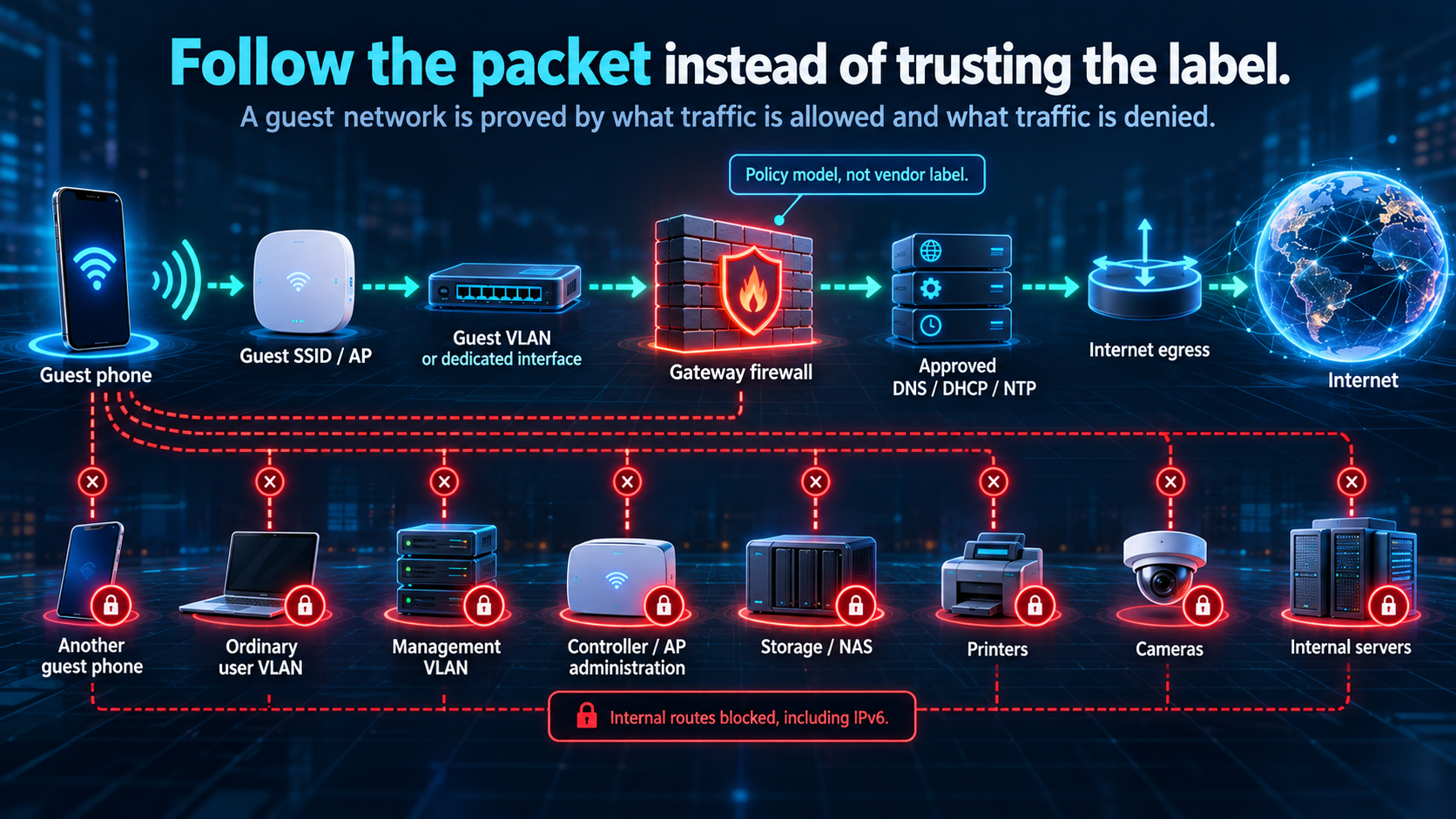
This is a policy model, not a vendor configuration. It remains useful when the wireless system changes because it describes the outcome that the configuration must enforce.
Pay attention to the word "another" in the first denial. Some wireless products implement client isolation at the access point. That can block two associated Wi-Fi stations from exchanging frames while leaving both free to reach a wired system through the gateway. Some implementations exempt broadcast or multicast traffic so discovery protocols still work. Some isolate only clients connected to the same radio. A design review needs the product's exact behavior, not the label used in its dashboard.
The upstream boundary needs a rule set too. A common starting policy allows guest DHCP, DNS to named resolvers, NTP to a named source, and Internet egress. It denies all organization-owned internal destination prefixes and management paths, regardless of whether their addresses are private or globally assigned, unless the design names an exception. RFC1918 blocking is only a supplemental guardrail, not the definition of the internal network. That rule set needs IPv6 treatment as well. A guest policy that denies only IPv4 private ranges can leave an IPv6 route to internal services open.
I would also keep access-point and controller administration off the guest path. A guest who can reach the management interface may not have credentials, but exposing the interface creates an unnecessary authentication target and makes reconnaissance easier.
Test the positive path and the denials
A guest network should have a small test record. The following is a synthetic example using documentation address space. It does not describe a real network.
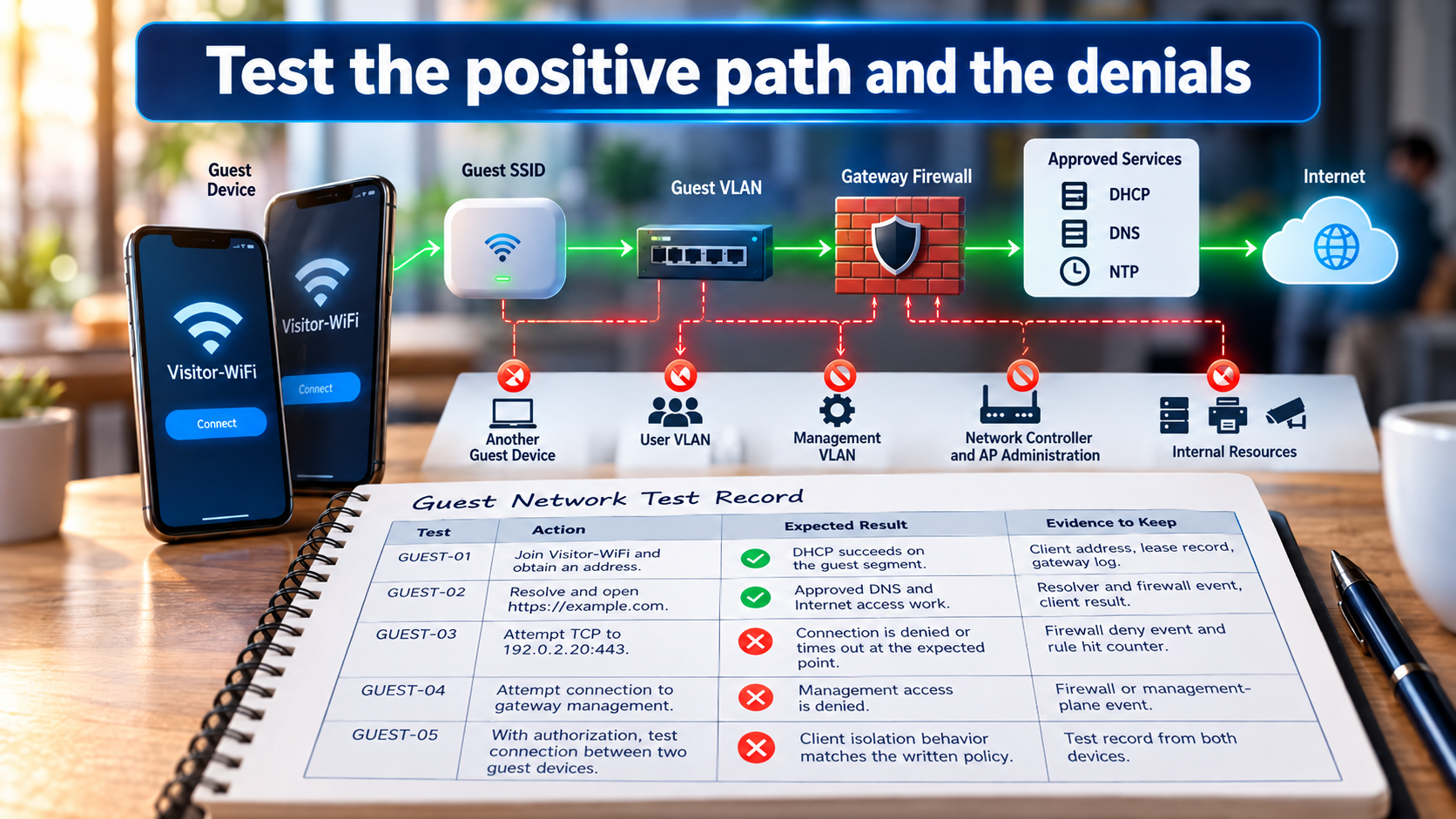
| Test | Action | Expected result | Evidence to keep |
|---|---|---|---|
| GUEST-01 | Join Visitor-WiFi and obtain an address. |
DHCP succeeds on the guest segment. | Client address, lease record, gateway log. |
| GUEST-02 | Resolve and open https://example.com. |
Approved DNS and Internet access work. | Resolver and firewall event, client result. |
| GUEST-03 | Attempt a TCP connection to a documented internal test service at 192.0.2.20:443. |
The connection is denied or times out at the expected enforcement point. | Firewall deny event and rule hit counter. |
| GUEST-04 | Attempt a connection to the gateway management address from the guest segment. | Management access is denied. | Firewall or management-plane event. |
| GUEST-05 | With authorization, attempt a local connection between two guest test devices. | Client isolation behavior matches the written policy. | Test record from both devices. |
A client-side timeout alone is weak proof. The target could be down, misaddressed, or protected by its own host firewall. The stronger result joins the client attempt to a firewall log or counter at the guest boundary. If client isolation is claimed, test it with two devices that are actually associated to the guest SSID, not one wireless device and one wired laptop.
Keep the test scoped. Do not scan a home, school, hotel, or employer network. Use two devices you control and a designated test service. Testing an explicit deny is enough; inventorying every reachable host is not necessary to prove one firewall policy.
Things that make a clean diagram misleading
Guest isolation often fails at the edges of the drawing.
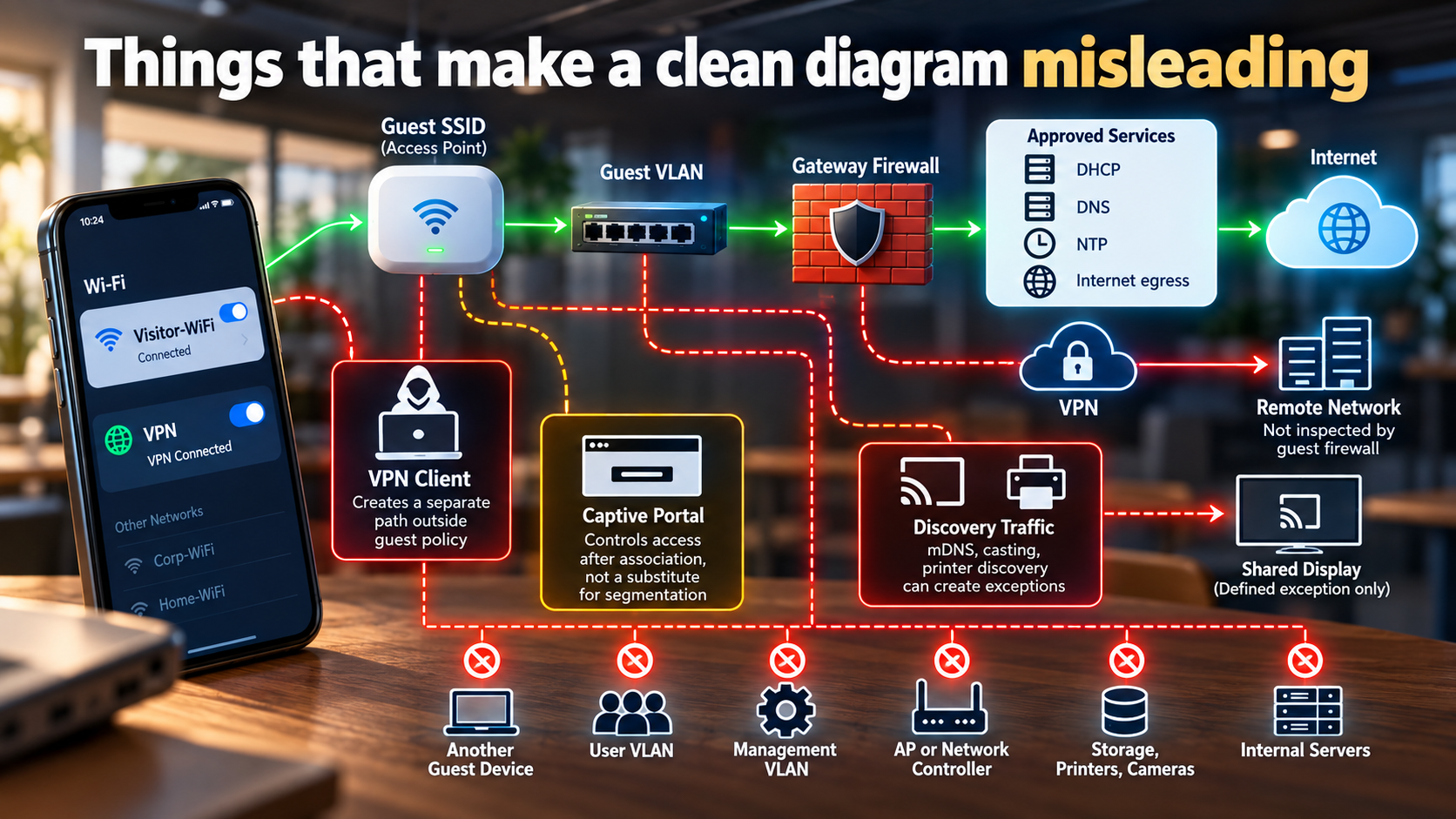
A VPN client on a guest device can create a path out of the guest policy, but that path belongs to the VPN design and the device owner. The guest firewall cannot reliably inspect a tunnel it does not terminate. State that limit instead of promising that guest Wi-Fi controls every destination a managed phone might reach.
Captive portals have a similar boundary. They can control who receives Internet access after association. They are not a substitute for segmentation, and portal outages need a decided behavior. A venue might choose to deny new associations while allowing existing guests to keep their leases. A small office may choose to fail the portal open for a limited guest network during an outage. The right decision depends on why the portal exists and what services the guest segment can reach.
Discovery is another source of accidental exceptions. Casting or printer discovery may use multicast DNS or vendor discovery traffic. If a guest needs one shared presentation display, define that service as an exception with a source, destination, protocol, owner, expiry, and test. Do not solve the problem by allowing the guest VLAN to route to the entire user VLAN. The convenient rule will become permanent because nobody remembers why it was added.
A guest network is a service boundary
I prefer a guest network with a plain contract:
Purpose: Internet access for untrusted visitor devices.
Permitted local services: DHCP, named DNS resolvers, named time service.
Permitted upstream service: Internet egress through the guest gateway.
Denied destinations: internal user, server, storage, camera, and management segments.
Peer policy: guest-to-guest traffic denied unless a documented service requires it.
Evidence: DHCP records, firewall policy readback, positive Internet test, and negative internal-path tests.
Owner: the person or team that owns the gateway policy.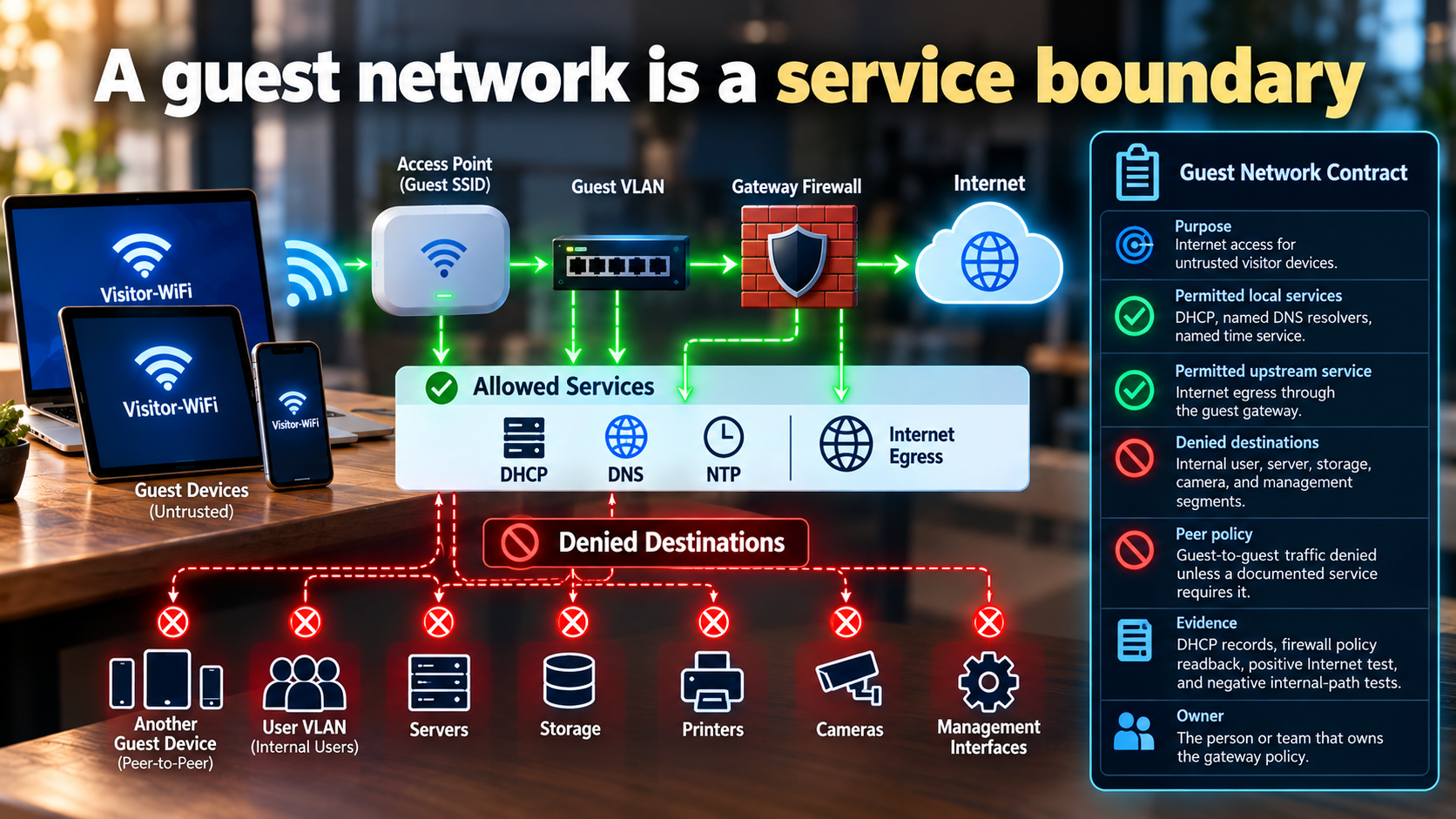
That contract gives the SSID a meaning. It also produces a better troubleshooting path. If a guest cannot browse, check association, DHCP, DNS, gateway policy, and Internet egress in that order. If a guest can browse but reaches a printer, skip the wireless password discussion and inspect routing, firewall policy, and any discovery exception.
The guest Wi-Fi name is still worth having. It tells people where to connect and keeps visitor credentials out of the ordinary wireless network. Just do not mistake the label for the boundary. The boundary is proved by the traffic that succeeds and the traffic that stops.


